Oct 22, 2015
Got myself Android device only recently, and first thing I wanted to do, of
course, was to ssh into it.
But quick look at the current F-Droid and Play apps shows that they either based
on a quite limited dropbear (though perfectly fine for one-off shell access) or
"based on openssh code", where infamous Debian OpenSSL code patch comes to
mind, not to mention that most look like ad-ridden proprietary piece of crap.
Plus I'd want a proper package manager, shell (zsh), tools and other stuff in
there, not just some baseline bash and busybox, and chroot with regular linux
distro is a way to get all that plus standard OpenSSH daemon.
Under the hood, modern Android (5.11 in my case, with CM 12) phone is not much
more than Java VM running on top of SELinux-enabled (which I opted to keep for
Android stuff) Linux kernel, on top of some multi-core ARMv7 CPU (quadcore in my
case, rather identical to one in RPi2).
Steps I took to have sshd running on boot with such device:
Flush stock firmware (usually loaded with adware and crapware) and install
some pre-rooted firmware image from xda-developers.com or 4pda.ru.
My phone is a second-hand Samsung Galaxy S3 Neo Duos (GT-I9300I), and I picked
resurrection remix CM-based ROM for it, built for this phone from
t3123799, with Open GApps arm 5.1 Pico (minimal set of google stuff).
That ROM (like most of them, it appears) comes with bash, busybox and - most
importantly - SuperSU, which runs its unrestricted init, and is crucial to
getting chroot-script to start on boot.
All three of these are needed.
Under Windows, there's Odin suite for flashing zip with all the goodies to
USB-connected phone booted into "download mode".
On Linux, there's Heimdall (don't forget to install adb with that, e.g. via
pacman -S android-tools android-udev on Arch), which can dd img files for
diff phone partitions, but doesn't seem to support "one zip with everything"
format that most firmwares come in.
Instead of figuring out which stuff from zip to upload where with Heimdall,
I'd suggest grabbing a must-have TWRP recovery.img (small os that boots in
"recovery mode", grabbed one for my phone from t2906840), flashing it with
e.g. heimdall flash --RECOVERY recovery.twrp-2.8.5.0.img and then booting
into it to install whatever main OS and apps from zip's on microSD card.
TWRP (or similar CWM one) is really useful for a lot of OS-management stuff
like app-packs installation (e.g. Open GApps) or removal, updates, backups,
etc, so I'd definitely suggest installing one of these as recovery.img as the
first thing on any Android device.
Get or make ARM chroot tarball.
I did this by bootstrapping a stripped-down ARMv7 Arch Linux ARM chroot on
a Raspberry Pi 2 that I have around:
# pacman -Sg base

 ### Look through the list of packages,
 ###  drop all the stuff that won't ever be useful in chroot on the phone,
 ###  e.g. pciutils, usbutils, mdadm, lvm2, reiserfsprogs, xfsprogs, jfsutils, etc

 ### pacstrap chroot with whatever is left

# mkdir droid-chroot
# pacstrap -i -d droid-chroot bash bzip2 coreutils diffutils file filesystem \
    findutils gawk gcc-libs gettext glibc grep gzip iproute2 iputils less \
    licenses logrotate man-db man-pages nano pacman perl procps-ng psmisc \
    sed shadow sysfsutils tar texinfo util-linux which

 ### Install whatever was forgotten in pacstrap

# pacman -r droid-chroot -S --needed atop busybox colordiff dash fping git \
    ipset iptables lz4 openssh patch pv rsync screen xz zsh fcron \
    python2 python2-pip python2-setuptools python2-virtualenv

 ### Make a tar.gz out of it all

# rm -f droid-chroot/var/cache/pacman/pkg/*
# tar -czf droid-chroot.tar.gz droid-chroot
Same can be obviously done with debootstrap or whatever other distro-of-choice
bootstrapping tool, but likely has to be done on a compatible architecture -
something that can run ARMv7 binaries, like RPi2 in my case (though VM should
do too) - to run whatever package hooks upon installs.
Easier way (that won't require having spare ARM box or vm) would be to take
pre-made image for any ARMv7 platform, from http://os.archlinuxarm.org/os/
list or such, but unless there's something very generic (which
e.g. "ArchLinuxARM-armv7-latest.tar.gz" seem to be), there's likely be some
platform-specific cruft like kernel, modules, firmware blobs, SoC-specific
tools and such... nothing that can't be removed at any later point with
package manager or simple "rm", of course.
While architecture in my case is ARMv7, which is quite common nowadays (2015),
other devices can have Intel SoCs with x86 or newer 64-bit ARMv8 CPUs.
For x86, bootstrapping can obviously be done on pretty much any desktop/laptop
machine, if needed.
Get root shell on device and unpack chroot tarball there.
adb shell (pacman -S android-tools android-udev or other distro
equivalent, if missing) should get "system" shell on a USB-connected phone.
(btw, "adb" access have to be enabled on the phone via some common "tap 7
times on OS version in Settings-About then go to Developer-options" dance, if
not already)
With SuperSU (or similar "su" package) installed, next step would be running
"su" there to get unrestricted root, which should work.
/system and /data should be on ext4 (check mount | grep ext4 for
proper list), f2fs or such "proper" filesystem, which is important to have for
all the unix permission bits and uid/gid info which e.g. FAT can't handle
(loopback img with ext4 can be created in that case, but shouldn't be
necessary in case of internal flash storage, which should have proper fs'es
already).
/system is a bad place for anything custom, as it will be completely
flushed on most main-OS changes (when updating ROM from zip with TWRP, for
instance), and is mounted with "ro" on boot anyway.
Any subdir in /data seem to work fine, though one obvious pre-existing
place - /data/local - is probably a bad idea, as it is used by some
Android dev tools already.
With busybox and proper bash on the phone, unpacking tarball from e.g. microSD
card should be easy:
# mkdir -m700 /data/chroots
# cd /data/chroots
# tar -xpf /mnt/sdcard/droid-chroot.tar.gz
It should already work, too, so...
# cd droid-chroot
# mount -o bind /dev dev \
    && mount -o bind /dev/pts dev/pts \
    && mount -t proc proc proc \
    && mount -t sysfs sysfs sys
# env -i TERM=$TERM SHELL=/bin/zsh HOME=/root $(which chroot) . /bin/zsh
...should produce a proper shell in a proper OS, yay! \o/
Furthermore, to be able to connect there directly, without adb or USB cable,
env -i $(which chroot) . /bin/sshd should work too.
For sshd in particular, one useful thing to do here is:
# $(which chroot) . /bin/ssh-keygen -A
...to populate /etc/ssh with keys, which are required to start sshd.
Setup init script to run sshd or whatever init-stuff from that chroot on boot.
Main trick here is to run it with unrestricted SELinux context
(unless SELinux is disabled entirely, I guess).
This makes /system/etc/init.d using "sysinit_exec" and
/data/local/userinit.sh with "userinit_exec" unsuitable for the task, only
something like "init" ("u:r:init:s0") will work.
SELinux on Android is documented in Android docs, and everything about
SELinux in general applies there, of course, but some su-related roles like
above "userinit_exec" actually come with CyanogenMod or whatever similar
hacks on top of the base Android OS.
Most relevant info on this stuff comes with SuperSU though (or rather
libsuperuser) - http://su.chainfire.eu/
That doc has info on how to patch policies, to e.g. transition to unrestricted
role for chroot init, setup sub-roles for stuff in there (to also use SELinux
in a chroot), which contexts are used where, and - most useful in this case -
which custom "init" dirs are used at which stages of the boot process.
Among other useful stuff, it specifies/describes /system/su.d init-dir,
from which SuperSU runs scripts/binaries with unrestricted "init" context, and
very early in the process too, hence it is most suitable for starting chroot
from.
So, again, from root (after "su") shell:
# mount -o remount,rw /system
# mkdir -m700 /system/su.d

# cat >/system/su.d/chroots.sh <<EOF
#!/system/bin/sh
exec /data/local/chroots.bash
EOF

# chmod 700 /system/su.d/chroots.sh

# cat >/data/local/chroots.bash <<EOF
#!/system/xbin/bash
export PATH=/sbin:/vendor/bin:/system/sbin:/system/bin:/system/xbin

log=/data/local/chroots.log
[[ $(du -m "$log" | awk '{print $1}') -gt 20 ]] && mv "$log"{,.old}
exec >>"$log" 2>&1
echo " --- Started $(TZ=UTC date) --- "

log -p i -t chroots "Starting chroot: droid-chroot"
/data/chroots/droid-chroot.sh &
disown

log -p i -t chroots "Finished chroots init"

echo " --- Finished $(TZ=UTC date) --- "
EOF

# chmod 700 /data/local/chroots.bash

# cd /data/chroots
# mkdir -p droid-chroot/mnt/storage
# ln -s droid-chroot/init.sh droid-chroot.sh

# cat >droid-chroot/init.sh <<EOF
#!/system/xbin/bash
set -e -o pipefail

usage() {
  bin=$(basename $0)
  echo >&2 "Usage: $bin [ stop | chroot ]"
  exit ${1:-0}
}
[[ "$#" -gt 1 || "$1" = -h || "$1" = --help ]] && usage

cd /data/chroots/droid-chroot

sshd_pid=$(cat run/sshd.pid 2>/dev/null ||:)

mountpoint -q dev || mount -o bind /dev dev
mountpoint -q dev/pts || mount -o bind /dev/pts dev/pts
mountpoint -q proc || mount -t proc proc proc
mountpoint -q sys || mount -t sysfs sysfs sys
mountpoint -q tmp || mount -o nosuid,nodev,size=20%,mode=1777 -t tmpfs tmpfs tmp
mountpoint -q run || mount -o nosuid,nodev,size=20% -t tmpfs tmpfs run
mountpoint -q mnt/storage || mount -o bind /data/media/0 mnt/storage

case "$1" in
  stop)
    [[ -z "$sshd_pid" ]] || kill "$sshd_pid"
    exit 0 ;;
  chroot)
    exec env -i\
      TERM="$TERM" SHELL=/bin/zsh HOME=/root\
      /system/xbin/chroot . /bin/zsh ;;
  *) [[ -z "$1" ]] || usage 1 ;;
esac

[[ -n "$sshd_pid" ]]\
  && kill -0 "$sshd_pid" 2>/dev/null\
  || exec env -i /system/xbin/chroot . /bin/sshd
EOF

# chmod 700 droid-chroot/init.sh
To unpack all that wall-of-shell a bit:
Very simple /system/su.d/chroots.sh is created, so that it can easily be
replaced if/when /system gets flushed by some update, and also so that
it won't need to be edited (needing rw remount) ever.
/data/local/chroots.bash is an actual init script for whatever chroots,
with Android logging stuff (accessible via e.g. adb logcat, useful to
check if script was ever started) and simpler more reliable (and rotated)
log in /data/local/chroots.log.
/data/chroots/droid-chroot.sh is a symlink to init script in
/data/chroots/droid-chroot/init.sh, so that this script can be easily
edited from inside of the chroot itself.
/data/chroots/droid-chroot/init.sh is the script that mounts all the
stuff needed for the chroot and starts sshd there.
Can also be run from adb root shell to do the same thing, with "stop" arg to
kill that sshd, or with "chroot" arg to do all the mounts and chroot into
the thing from whatever current sh.
Basically everything to with that chroot from now on can/should be done
through that script.
"cat" commands can obviously be replaced with "nano" and copy-paste there, or
copying same (or similar) scripts from card or whatever other paths (to avoid
pasting them into shell, which might be less convenient than Ctrl+S in
$EDITOR).
Reboot, test sshd, should work.
Anything other than sshd can also be added to that init script, to make some
full-featured dns + web + mail + torrents server setup start in chroot.
With more than a few daemons, it'd probably be a good idea to start just one
"daemon babysitter" app from there, such as runit, daemontools or whatever.
Maybe even systemd will work, though unlikely, given how it needs udev, lots of
kernel features and apis initialized in its own way, and such.
Obvious caveat for running a full-fledged linux separately from main OS is that
it should probably be managed through local webui's or from some local terminal
app, and won't care much about power management and playing nice with Android
stuff.
Android shouldn't play nice with such parasite OS either, cutting network or
suspending device when it feels convenient, without any regard for conventional
apps running there, though can be easily configured not to.
As I'm unlikely to want this device as a phone ever (who needs these, anyway?),
turning it into something more like wireless RPi2 with a connected management
terminal (represented by Android userspace) sounds like the only good use for it
so far.
Update 2016-05-16: Added note on ssh-keygen and rm for pacman package cache
after pacstrap.
Sep 04, 2015
Adding key derivation to git-nerps from OpenSSH keys, needed to get the actual
"secret" or something deterministically (plus in an obvious and stable way)
derived from it (to then feed into some pbkdf2 and get the symmetric key).
Idea is for liteweight ad-hoc vms/containers to have a single "master secret",
from which all others (e.g. one for git-nerps' encryption) can be easily derived
or decrypted, and omnipresent, secure, useful and easy-to-generate ssh key in
~/.ssh/id_ed25519 seem to be the best candidate.
Unfortunately, standard set of ssh tools from openssh doesn't seem to have
anything that can get key material or its hash - next best thing is to get
"fingerprint" or such, but these are derived from public keys, so not what I
wanted at all (as anyone can derive that, having public key, which isn't
secret).
And I didn't want to hash full openssh key blob, because stuff there isn't
guaranteed to stay the same when/if you encrypt/decrypt it or do whatever
ssh-keygen does.
What definitely stays the same is the values that openssh plugs into crypto
algos, so wrote a full parser for the key format (as specified in PROTOCOL.key
file in openssh sources) to get that.
While doing so, stumbled upon fairly obvious and interesting application for
such parser - to get really and short easy to backup, read or transcribe
string which is the actual secret for Ed25519.
I.e. that's what OpenSSH private key looks like:
-----BEGIN OPENSSH PRIVATE KEY-----
b3BlbnNzaC1rZXktdjEAAAAABG5vbmUAAAAEbm9uZQAAAAAAAAABAAAAMwAAAAtzc2gtZW
QyNTUxOQAAACDaKUyc/3dnDL+FS4/32JFsF88oQoYb2lU0QYtLgOx+yAAAAJi1Bt0atQbd
GgAAAAtzc2gtZWQyNTUxOQAAACDaKUyc/3dnDL+FS4/32JFsF88oQoYb2lU0QYtLgOx+yA
AAAEAc5IRaYYm2Ss4E65MYY4VewwiwyqWdBNYAZxEhZe9GpNopTJz/d2cMv4VLj/fYkWwX
zyhChhvaVTRBi0uA7H7IAAAAE2ZyYWdnb2RAbWFsZWRpY3Rpb24BAg==
-----END OPENSSH PRIVATE KEY-----
And here's the only useful info in there, enough to restore whole blob above
from, in the same base64 encoding:
HOSEWmGJtkrOBOuTGGOFXsMIsMqlnQTWAGcRIWXvRqQ=
Latter, of course, being way more suitable for tried-and-true "write on a
sticker and glue at the desk" approach.
Or one can just have a file with one host key per line - also cool.
That's the 32-byte "seed" value, which can be used to derive "ed25519_sk" field
("seed || pubkey") in that openssh blob, and all other fields are either "none",
"ssh-ed25519", "magic numbers" baked into format or just padding.
So rolled the parser from git-nerps into its own tool - ssh-keyparse, which
one can run and get that string above for key in ~/.ssh/id_ed25519, or do some
simple crypto (as implemented by djb in ed25519.py, not me) to recover full
key from the seed.
From output serialization formats that tool supports, especially liked the idea
of Douglas Crockford's Base32 - human-readable one, where all confusing
l-and-1 or O-and-0 chars are interchangeable, and there's an optional checksum
(one letter) at the end:
% ssh-keyparse test-key --base32
3KJ8-8PK1-H6V4-NKG4-XE9H-GRW5-BV1G-HC6A-MPEG-9NG0-CW8J-2SFF-8TJ0-e

% ssh-keyparse test-key --base32-nodashes
3KJ88PK1H6V4NKG4XE9HGRW5BV1GHC6AMPEG9NG0CW8J2SFF8TJ0e
base64 (default) is still probably most efficient for non-binary (there's --raw
otherwise) backup though.
[ssh-keyparse code link]
Sep 01, 2015
Have been installing things to an OS containers (/var/lib/machines) lately, and
looking for proper configuration management in these.
Large-scale container setups use some hard-to-integrate things like etcd, where
you have to template configuration from values in these, which is not very
convenient and very low effort-to-results ratio (maintenance of that system
itself) for "10 service containers on 3 hosts" case.
Besides, such centralized value store is a bit backwards for
one-container-per-service case, where most values in such "central db" are
specific to one container, and it's much easier to edit end-result configs then
db values and then templates and then check how it all gets rendered on every
trivial tweak.
Usual solution I have for these setups is simply putting all confs under git
control, but leaving all the secrets (e.g. keys, passwords, auth data) out of
the repo, in case it might be pulled from on other hosts, by different people
and for purposes which don't need these sensitive bits and might leak them
(e.g. giving access to contracted app devs).
For more transient container setups, something should definitely keep track of
these "secrets" however, as "rm -rf /var/lib/machines/..." is much more
realistic possibility and has its uses.
So my (non-original) idea here was to have one "master key" per host - just one
short string - with which to encrypt all secrets for that host, which can then
be shared between hosts and specific people (making these public might still be
a bad idea), if necessary.
This key should then be simply stored in whatever key-management repo, written
on a sticker and glued to a display, or something.
Git can be (ab)used for such encryption, with its "filter" facilities, which are
generally used for opposite thing (normalization to one style), but are easy to
adapt for this case too.
Git filters work by running "clear" operation on selected paths (can be a
wildcard patterns like "*.c") every time git itself uses these and "smudge"
when showing to user and checking them out to a local copy (where they are
edited).
In case of encryption, "clear" would not be normalizing CR/LF in line endings,
but rather wrapping contents (or parts of them) into a binary blob, and "smudge"
should do the opposite, and gitattributes patterns would match files to be
encrypted.
Looking for projects that already do that, found quite a few, but still
decided to write my own tool, because none seem have all the things I wanted:
Use sane encryption.
It's AES-CTR in the absolutely best case, and AES-ECB (wtf!?) in some,
sometimes openssl is called with "password" on the command line (trivial to
spoof in /proc).
OpenSSL itself is a red flag - hard to believe that someone who knows how bad
its API and primitives are still uses it willingly, for non-TLS, at least.
Expected to find at least one project using AEAD through NaCl or something,
but no such luck.
Have tool manage gitattributes.
You don't add file to git repo by typing /path/to/myfile
managed=version-control some-other-flags to some config, why should you do
it here?
Be easy to deploy.
Ideally it'd be a script, not some c++/autotools project to install build
tools for or package to every setup.
Though bash script is maybe taking it a bit too far, given how messy it is for
anything non-trivial, secure and reliable in diff environments.
Have "configuration repository" as intended use-case.
So wrote git-nerps python script to address all these.
Crypto there is trivial yet solid PyNaCl stuff, marking files for encryption is
as easy as git-nerps taint /what/ever/path and bootstrapping the thing
requires nothing more than python, git, PyNaCl (which are norm in any of my
setups) and git-nerps key-gen in the repo.
README for the project has info on every aspect of how the thing works and more
on the ideas behind it.
I expect it'll have a few more use-case-specific features and
convenience-wrapper commands once I'll get to use it in a more realistic cases
than it has now (initially).
[project link]
Aug 22, 2015
On cue from irc, recently ran this experiment:
% a=(); for n in {1..100}; do f=ls_$n; cp /usr/bin/ls $f; echo $n >> $f; a+=( $f ); done
% 7z a test.7z "${a[@]}" >/dev/null
% tar -cf test.tar "${a[@]}"
% gzip < test.tar > test.tar.gz
% xz < test.tar > test.tar.xz
% rm -f "${a[@]}"

% ls -lahS test.*
-rw-r--r-- 1 fraggod fraggod  12M Aug 22 19:03 test.tar
-rw-r--r-- 1 fraggod fraggod 5.1M Aug 22 19:03 test.tar.gz
-rw-r--r-- 1 fraggod fraggod 465K Aug 22 19:03 test.7z
-rw-r--r-- 1 fraggod fraggod  48K Aug 22 19:03 test.tar.xz
Didn't realize that gz was that bad at such deduplication task.
Also somehow thought (and never really bothered to look it up) that 7z was
compressing each file individually by default, which clearly is not the case,
as overall size should be 10x of what 7z produced then.
Docs agree on "solid" mode being the default of course, meaning no easy "pull
one file out of the archive" unless explicitly changed - useful to know.
Further 10x difference between 7z and xz is kinda impressive, even for such
degenerate case.
May 19, 2015
Quite often recently VoDs on twitch for me are just unplayable through the flash
player - no idea what happens at the backend there, but it buffers endlessly at
any quality level and that's it.
I also need to skip to some arbitrary part in the 7-hour stream (last wcs sc2
ro32), as I've watched half of it live, which turns out to complicate things a bit.
So the solution is to download the thing, which goes something like this:
It's just a video, right? Let's grab whatever stream flash is playing (with
e.g. FlashGot FF addon).
Doesn't work easily, since video is heavily chunked.
It used to be 30-min flv chunks, which are kinda ok, but these days it's
forced 4s chunks - apparently backend doesn't even allow downloading more
than 4s per request.
Fine, youtube-dl it is.
Nope. Doesn't allow seeking to time in stream.
livestreamer wrapper around the thing doesn't allow it either.
Try to use ?t=3h30m URL parameter - doesn't work, sadly.
mpv supports youtube-dl and seek, so use that.
Kinda works, but only for super-short seeks.
Seeking beyond e.g. 1 hour takes AGES, and every seek after that (even
skipping few seconds ahead) takes longer and longer.
youtube-dl --get-url gets m3u8 playlist link, use ffmpeg -ss <pos>
with it.
Apparently works exactly same as mpv above - takes like 20-30min to seek to
3:30:00 (3.5 hour offset).
Dunno if it downloads and checks every chunk in the playlist for length
sequentially... sounds dumb, but no clue why it's that slow otherwise,
apparently just not good with these playlists.
Grab the m3u8 playlist, change all relative links there into full urls, remove
bunch of them from the start to emulate seek, play that with ffmpeg | mpv.
Works at first, but gets totally stuck a few seconds/minutes into the video,
with ffmpeg doing bitrates of ~10 KiB/s.
youtube-dl apparently gets stuck in a similar fashion, as it does the same
ffmpeg-on-a-playlist (but without changing it) trick.
Fine! Just download all the damn links with curl.
grep '^http:' pls.m3u8 | xargs -n50 curl -s | pv -rb -i5 > video.mp4
Makes it painfully obvious why flash player and ffmpeg/youtube-dl get stuck -
eventually curl stumbles upon a chunk that downloads at a few KiB/s.
This "stumbling chunk" appears to be a random one, unrelated to local
bandwidth limitations, and just re-trying it fixes the issue.
Assemble a list of links and use some more advanced downloader that can do
parallel downloads, plus detect and retry super-low speeds.
Naturally, it's aria2, but with all the parallelism it appears to be
impossible to guess which output file will be which with just a cli.
Mostly due to links having same url-path,
e.g. index-0000000014-O7tq.ts?start_offset=955228&end_offset=2822819 with
different offsets (pity that backend doesn't seem to allow grabbing range of
that *.ts file of more than 4s) - aria2 just does file.ts, file.ts.1,
file.ts.2, etc - which are not in playlist-order due to all the parallel
stuff.
Finally, as acceptance dawns, go and write your own youtube-dl/aria2 wrapper
to properly seek necessary offset (according to playlist tags) and
download/resume files from there, in a parallel yet ordered and controlled
fashion.
This is done by using --on-download-complete hook with passing ordered "gid"
numbers for each chunk url, which are then passed to the hook along with the
resulting path (and hook renames file to prefix + sequence number).
Ended up with the chunk of the stream I wanted, locally (online playback lag
never goes away!), downloaded super-fast and seekable.
Resulting script is twitch_vod_fetch (script source link).
Update 2017-06-01: rewritten it using python3/asyncio since then, so stuff
related to specific implementation details here is only relevant for old py2 version
(can be pulled from git history, if necessary).
aria2c magic bits in the script:
aria2c = subprocess.Popen([
  'aria2c',

  '--stop-with-process={}'.format(os.getpid()),
  '--enable-rpc=true',
  '--rpc-listen-port={}'.format(port),
  '--rpc-secret={}'.format(key),

  '--no-netrc', '--no-proxy',
  '--max-concurrent-downloads=5',
  '--max-connection-per-server=5',
  '--max-file-not-found=5',
  '--max-tries=8',
  '--timeout=15',
  '--connect-timeout=10',
  '--lowest-speed-limit=100K',
  '--user-agent={}'.format(ua),

  '--on-download-complete={}'.format(hook),
], close_fds=True)
Didn't bother adding extra options for tweaking these via cli, but might be a
good idea to adjust timeouts and limits for a particular use-case (see also the
massive "man aria2c").
Seeking in playlist is easy, as it's essentially a VoD playlist, and every ~4s
chunk is preceded by e.g. #EXTINF:3.240, tag, with its exact length, so
script just skips these as necessary to satisfy --start-pos / --length
parameters.
Queueing all downloads, each with its own particular gid, is done via JSON-RPC,
as it seem to be impossible to:
- Specify both link and gid in the --input-file for aria2c.
- Pass an actual download URL or any sequential number to --on-download-complete
hook (except for gid).
So each gid is just generated as "000001", "000002", etc, and hook script is a
one-liner "mv" command.
Since all stuff in the script is kinda lenghty time-wise - e.g. youtube-dl
--get-url takes a while, then the actual downloads, then concatenation, ... -
it's designed to be Ctrl+C'able at any point.
Every step just generates a state-file like "my_output_prefix.m3u8", and next
one goes on from there.
Restaring the script doesn't repeat these, and these files can be freely
mangled or removed to force re-doing the step (or to adjust behavior in
whatever way).
Example of useful restart might be removing *.m3u8.url and *.m3u8 files if
twitch starts giving 404's due to expired links in there.
Won't force re-downloading any chunks, will only grab still-missing ones and
assemble the resulting file.
End-result is one my_output_prefix.mp4 file with specified video chunk (or full
video, if not specified), plus all the intermediate litter (to be able to
restart the process from any point).
One issue I've spotted with the initial version:
05/19 22:38:28 [ERROR] CUID#77 - Download aborted. URI=...
Exception: [AbstractCommand.cc:398] errorCode=1 URI=...
  -> [RequestGroup.cc:714] errorCode=1 Download aborted.
  -> [DefaultBtProgressInfoFile.cc:277]
    errorCode=1 total length mismatch. expected: 1924180, actual: 1789572
05/19 22:38:28 [NOTICE] Download GID#0035090000000000 not complete: ...
Seem to be a few of these mismatches (like 5 out of 10k chunks), which don't get
retried, as aria2 doesn't seem to consider these to be a transient errors (which
is probably fair).
Probably a twitch bug, as it clearly breaks http there, and browsers shouldn't
accept such responses either.
Can be fixed by one more hook, I guess - either --on-download-error (to make
script retry url with that gid), or the one using websocket and getting json
notification there.
In any case, just running same command again to download a few of these
still-missing chunks and finish the process works around the issue.
Update 2015-05-22: Issue clearly persists for vods from different chans,
so fixed it via simple "retry all failed chunks a few times" loop at the end.
Update 2015-05-23: Apparently it's due to aria2 reusing same files for
different urls and trying to resume downloads, fixed by passing --out for each
download queued over api.
[script source link]
Apr 11, 2015
Did a kinda-overdue migration of a desktop machine to amd64 a few days ago.
Exherbo has
multiarch there, but I didn't see much point in keeping (and
maintaining in various ways) a full-blown set of 32-bit libs just for Skype,
which I found that I still need occasionally.
Solution I've used before (documented in the past entry) with just grabbing
32-bit Skype binary and full set of libs it needs from whatever distro still
works and applies here, not-so-surprisingly.
What I ended up doing is:
Grab the latest Fedora "32-bit workstation" iso (Fedora-Live-Workstation-i686-21-5.iso).
Install/run it on a virtual machine (plain qemu-kvm).
Download "Dynamic" Skype version (distro-independent tar.gz with files) from
Skype site to/on a VM, "tar -xf" it.
ldd skype-4.3.0.37/skype | grep 'not found' to see which dependency-libs
are missing.
Install missing libs - yum install qtwebkit libXScrnSaver
scp build_skype_env.bash (from skype-space repo that I have from old
days of using skype + bitlbee) to vm, run it on a skype-dir -
e.g. ./build_skype_env.bash skype-4.3.0.37.
Should finish successfully and produce "skype_env" dir in the current path.
Copy that "skype_env" dir with all the libs back to pure-amd64 system.
Since skype binary has "/lib/ld-linux.so.2" as a hardcoded interpreter (as it
should be), and pure-amd64 system shouldn't have one (not to mention missing
multiarch prefix) - patch it in the binary with patchelf:
patchelf --set-interpreter ./ld-linux.so.2 skype
Run it (from that env dir with all the libs):
LD_LIBRARY_PATH=. ./skype --resources=.
Should "just work" \o/
One big caveat is that I don't care about any features there except for simple
text messaging, which is probably not how most people use Skype, so didn't
test if e.g. audio would work there.
Don't think sound should be a problem though, especially since iirc modern
skype could use pulseaudio (or even using it by default?).
Given that skype itself a huge opaque binary, I do have AppArmor profile for the
thing (uses "~/.Skype/env/" dir for bin/libs) - home.skype.
Mar 28, 2015
It probably won't be a surprise to anyone that Bluetooth has profiles to carry
regular network traffic, and BlueZ has support for these since forever, but
setup process has changed quite a bit between 2.X - 4.X - 5.X BlueZ versions, so
here's my summary of it with 5.29 (latest from fives atm).
First step is to get BlueZ itself, and make sure it's 5.X (at least for the
purposes of this post), as some enerprisey distros probably still have 4.X if
not earlier series, which, again, have different tools and interfaces.
Should be easy enough to do with bluetoothctl --version, and if BlueZ
doesn't have "bluetoothctl", it's definitely some earlier one.
Hardware in my case was two linux machines with similar USB dongles, one of them
was RPi (wanted to setup wireless link for that), but that shouldn't really matter.
Aforementioned bluetoothctl allows to easily pair both dongles from cli
interactively (and with nice colors!), that's what should be done first and
serves as an authentication, as far as I can tell.
--- machine-1
% bluetoothctl
[NEW] Controller 00:02:72:XX:XX:XX malediction [default]
[bluetooth]# power on
Changing power on succeeded
[CHG] Controller 00:02:72:XX:XX:XX Powered: yes
[bluetooth]# discoverable on
Changing discoverable on succeeded
[CHG] Controller 00:02:72:XX:XX:XX Discoverable: yes
[bluetooth]# agent on
...

--- machine-2 (snipped)
% bluetoothctl
[NEW] Controller 00:02:72:YY:YY:YY rpbox [default]
[bluetooth]# power on
[bluetooth]# scan on
[bluetooth]# agent on
[bluetooth]# pair 00:02:72:XX:XX:XX
[bluetooth]# trust 00:02:72:XX:XX:XX
...
Not sure if the "trust" bit is really necessary, and what it does - probably
allows to setup agent-less connections or something.
As I needed to connect small ARM board to what amounts to an access point, "NAP"
was the BT-PAN mode of choice for me, but there are also "ad-hoc" modes in BT
like PANU and GN, which seem to only need a different topology (who connects to
who) and pass different UUID parameter to BlueZ over dbus.
For setting up a PAN network with BlueZ 5.X, essentially just two dbus calls are
needed (described in "doc/network-api.txt"), and basic cli tools to do these are
bundled in "test/" dir with BlueZ sources.
Given that these aren't very suited for day-to-day use (hence the "test" dir)
and are fairly trivial, did rewrite them as a single script, more suited for my
purposes - bt-pan.
Update 2015-12-10: There's also "bneptest" tool, which comes as a part of
e.g. "bluez-utils" package on Arch, which seem to do same thing with its "-s"
and "-c" options, just haven't found it at the time (or maybe it's a more recent
addition).
General idea is that one side (access point in NAP topology) sets up a bridge
and calls "org.bluez.NetworkServer1.Register()", while the other ("client") does
"org.bluez.Network1.Connect()".
On the server side (which also applies to GN mode, I think), bluetoothd expects
a bridge interface to be setup and configured, to which it adds individual
"bnepX" interfaces created for each client by itself.
Such bridge gets created with "brctl" (from bridge-utils), and should be
assigned the server IP and such, then server itself can be started, passing name
of that bridge to BlueZ over dbus in "org.bluez.NetworkServer1.Register()" call:
#!/bin/bash

br=bnep

[[ -n "$(brctl show $br 2>&1 1>/dev/null)" ]] && {
  brctl addbr $br
  brctl setfd $br 0
  brctl stp $br off
  ip addr add 10.1.2.3/24 dev $br
  ip link set $br up
}

exec bt-pan --debug server $br
(as mentioned above, bt-pan script is from fgtk github repo)
Update 2015-12-10: This is "net.bnep" script, as referred-to in
"net-bnep.service" unit just below.
Update 2015-12-10: These days, systemd can easily create and configure
bridge, forwarding and all the interfaces involved, even running built-in DHCP
server there - see "man systemd.netdev" and "man systemd.network", for how to do
that, esp. examples at the end of both.
Just running this script will then setup a proper "bluetooth access point", and
if done from systemd, should probably be a part of bluetooth.target and get
stopped along with bluetoothd (as it doesn't make any sense running without it):
[Unit]
After=bluetooth.service
PartOf=bluetooth.service

[Service]
ExecStart=/usr/local/sbin/net.bnep

[Install]
WantedBy=bluetooth.target
Update 2015-12-10: Put this into e.g. /etc/systemd/system/net-bnep.service
and enable to start with "bluetooth.target" (see "man systemd.special") by
running systemctl enable net-bnep.service.
On the client side, it's even simpler - BlueZ will just create a "bnepX" device
and won't need any bridge, as it is just a single connection:
[Unit]
After=bluetooth.service
PartOf=bluetooth.service

[Service]
ExecStart=/usr/local/bin/bt-pan client --wait 00:02:72:XX:XX:XX

[Install]
WantedBy=bluetooth.target
Update 2015-12-10: Can be /etc/systemd/system/net-bnep-client.service,
don't forget to enable it (creates symlink in "bluetooth.target.wants"), same as
for other unit above (which should be running on the other machine).
Update 2015-12-10: Created "bnepX" device is also trivial to setup with
systemd on the client side, see e.g. "Example 2" at the end of "man
systemd.network".
On top of "bnepX" device on the client, some dhcp client should probably be
running, which systemd-networkd will probably handle by default on
systemd-enabled linuxes, and some dhcpd on the server-side (I used udhcpd from
busybox for that).
Enabling units on both machines make them setup AP and connect on boot, or as
soon as BT donges get plugged-in/detected.
Fairly trivial setup for a wireless one, especially wrt authentication, and seem
to work reliably so far.
Update 2015-12-10: Tried to clarify a few things above for people not very
familiar with systemd, where noted. See systemd docs for more info on all this.
In case something doesn't work in such a rosy scenario, which kinda happens
often, first place to look at is probably debug info of bluetoothd itself, which
can be enabled with systemd via systemctl edit bluetooth and adding a
[Service] section with override like ExecStart=/usr/lib/bluetooth/bluetoothd -d,
then doing daemon-reload and restart of the unit.
This should already produce a ton of debug output, but I generally find
something like bluetoothd[363]: src/device.c:device_bonding_failed() status 14
and bluetoothd[363]: plugins/policy.c:disconnect_cb() reason 3 in there,
which is not super-helpful by itself.
"btmon" tool which also comes with BlueZ provides a much more useful output with
all the stuff decoded from the air, even colorized for convenience (though you
won't see it here):
...
> ACL Data RX: Handle 11 flags 0x02 dlen 20               [hci0] 17.791382
      L2CAP: Information Response (0x0b) ident 2 len 12
        Type: Fixed channels supported (0x0003)
        Result: Success (0x0000)
        Channels: 0x0000000000000006
          L2CAP Signaling (BR/EDR)
          Connectionless reception
> HCI Event: Number of Completed Packets (0x13) plen 5    [hci0] 17.793368
        Num handles: 1
        Handle: 11
        Count: 2
> ACL Data RX: Handle 11 flags 0x02 dlen 12               [hci0] 17.794006
      L2CAP: Connection Request (0x02) ident 3 len 4
        PSM: 15 (0x000f)
        Source CID: 64
< ACL Data TX: Handle 11 flags 0x00 dlen 16               [hci0] 17.794240
      L2CAP: Connection Response (0x03) ident 3 len 8
        Destination CID: 64
        Source CID: 64
        Result: Connection pending (0x0001)
        Status: Authorization pending (0x0002)
> HCI Event: Number of Completed Packets (0x13) plen 5    [hci0] 17.939360
        Num handles: 1
        Handle: 11
        Count: 1
< ACL Data TX: Handle 11 flags 0x00 dlen 16               [hci0] 19.137875
      L2CAP: Connection Response (0x03) ident 3 len 8
        Destination CID: 64
        Source CID: 64
        Result: Connection refused - security block (0x0003)
        Status: No further information available (0x0000)
> HCI Event: Number of Completed Packets (0x13) plen 5    [hci0] 19.314509
        Num handles: 1
        Handle: 11
        Count: 1
> HCI Event: Disconnect Complete (0x05) plen 4            [hci0] 21.302722
        Status: Success (0x00)
        Handle: 11
        Reason: Remote User Terminated Connection (0x13)
@ Device Disconnected: 00:02:72:XX:XX:XX (0) reason 3
...
That at least makes it clear what's the decoded error message is, on which
protocol layer and which requests it follows - enough stuff to dig into.
BlueZ also includes a crapton of cool tools for all sorts of diagnostics and
manipulation, which - alas - seem to be missing on some distros, but can be
built along with the package using --enable-tools --enable-experimental
configure-options (all under "tools" dir).
I had to resort to these tricks briefly when trying to setup PANU/GN-mode
connections, but as I didn't really need these, gave up fairly soon on that
"Connection refused - security block" error (from that "policy.c" plugin) - no
idea why BlueZ throws it in this context and google doesn't seem to help much,
maybe polkit thing, idk.
Didn't need these modes though, so whatever.
Mar 25, 2015
Was looking at a weird what-looks-like-a-memleak issue somewhere in the system
on changing desktop background (somewhat surprisingly complex operation btw) and
wanted to get a nice graph of "last 30s of free -m output", with some labels
and easy access to data.
A simple enough task for gnuplot, but resulting in a somewhat complicated
solution, as neither "free" nor gnuplot are perfect tools for the job.
First thing is that free -m -s1 doesn't actually give a machine-readable
data, and I was too lazy to find something better (should've used sysstat and
sar!) and thought "let's just parse that with awk":
free -m -s $interval |
  awk '
    BEGIN {
      exports="total used free shared available"
      agg="free_plot.datz"
      dst="free_plot.dat"}
    $1=="total" {
      for (n=1;n<=NF;n++)
        if (index(exports,$n)) headers[n+1]=$n }
    $1=="Mem:" {
      first=1
      printf "" >dst
      for (n in headers) {
        if (!first) {
          printf " " >>agg
          printf " " >>dst }
        printf "%d", $n >>agg
        printf "%s", headers[n] >>dst
        first=0 }
      printf "\n" >>agg
      printf "\n" >>dst
      fflush(agg)
      close(dst)
      system("tail -n '$points' " agg " >>" dst) }'
That might be more awk than one ever wants to see, but I imagine there'd be not
too much space to wiggle around it, as gnuplot is also somewhat picky in its
input (either that or you can write same scripts there).
I thought that visualizing "live" stream of data/measurements would be kinda
typical task for any graphing/visualization solution, but meh, apparently not so
much for gnuplot, as I haven't found better way to do it than "reread" command.
To be fair, that command seem to do what I want, just not in a much obvious way,
seamlessly updating output in the same single window.
Next surprising quirk was "how to plot only last 30 points from big file", as it
seem be all-or-nothing with gnuplot, and googling around, only found that people
do it via the usual "tail" before the plotting.
Whatever, added that "tail" hack right to the awk script (as seen above), need
column headers there anyway.
Then I also want nice labels - i.e.:
- How much available memory was there at the start of the graph.
- How much of it is at the end.
- Min for that parameter on the graph.
- Same, but max.
stats won't give first/last values apparently, unless I missed those in
the PDF (
only available format for up-to-date docs,
le sigh), so one
solution I came up with is to do a dry-run
plot command with
set
terminal unknown and "grab first value" / "grab last value" functions to
"plot".
Which is not really a huge deal, as it's just a preprocessed batch of 30
points, not a huge array of data.
Ok, so without further ado...
src='free_plot.dat'
y0=100; y1=2000;
set xrange [1:30]
set yrange [y0:y1]

# --------------------
set terminal unknown
stats src using 5 name 'y' nooutput

is_NaN(v) = v+0 != v
y_first=0
grab_first_y(y) = y_first = y_first!=0 && !is_NaN(y_first) ? y_first : y
grab_last_y(y) = y_last = y

plot src u (grab_first_y(grab_last_y($5)))
x_first=GPVAL_DATA_X_MIN
x_last=GPVAL_DATA_X_MAX

# --------------------
set label 1 sprintf('first: %d', y_first) at x_first,y_first left offset 5,-1
set label 2 sprintf('last: %d', y_last) at x_last,y_last right offset 0,1
set label 3 sprintf('min: %d', y_min) at 0,y0-(y1-y0)/15 left offset 5,0
set label 4 sprintf('max: %d', y_max) at 0,y0-(y1-y0)/15 left offset 5,1

# --------------------
set terminal x11 nopersist noraise enhanced
set xlabel 'n'
set ylabel 'megs'

set style line 1 lt 1 lw 1 pt 2 pi -1 ps 1.5
set pointintervalbox 2

plot\
  src u 5 w linespoints linestyle 1 t columnheader,\
  src u 1 w lines title columnheader,\
  src u 2 w lines title columnheader,\
  src u 3 w lines title columnheader,\
  src u 4 w lines title columnheader,\

# --------------------
pause 1
reread
Probably the most complex gnuplot script I composed to date.
Yeah, maybe I should've just googled around for an app that does same thing,
though I like how this lore potentially gives ability to plot whatever other
stuff in a similar fashion.
That, and I love all the weird stuff gnuplot can do.
For instance, xterm apparently has some weird "plotter" interface hardware
terminals had in the past:
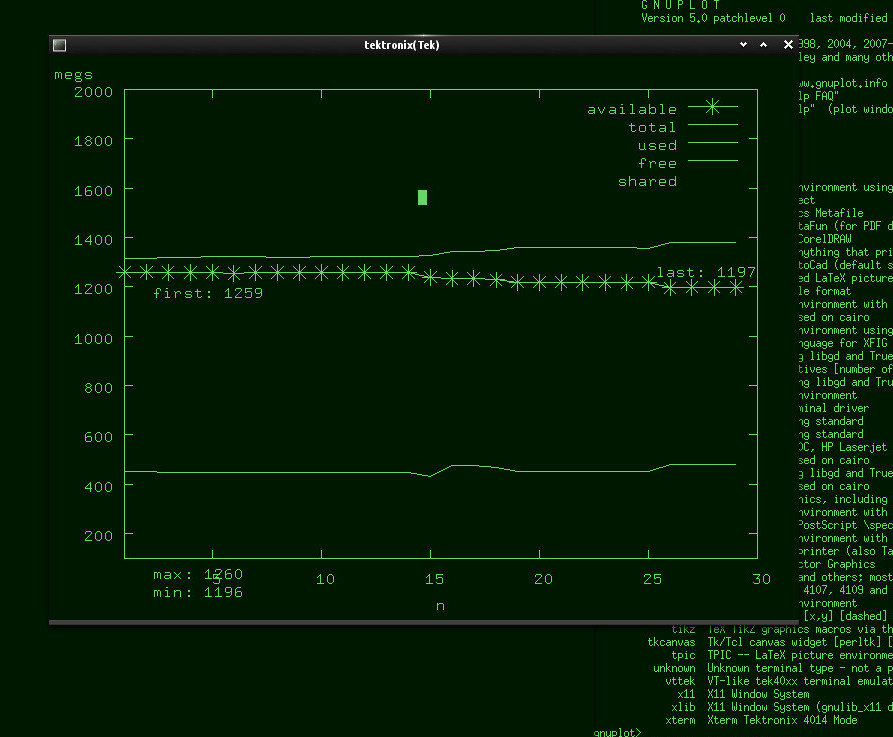
And there's also the famous "dumb" terminal for pseudographics too.
Regular x11 output looks nice and clean enough though:
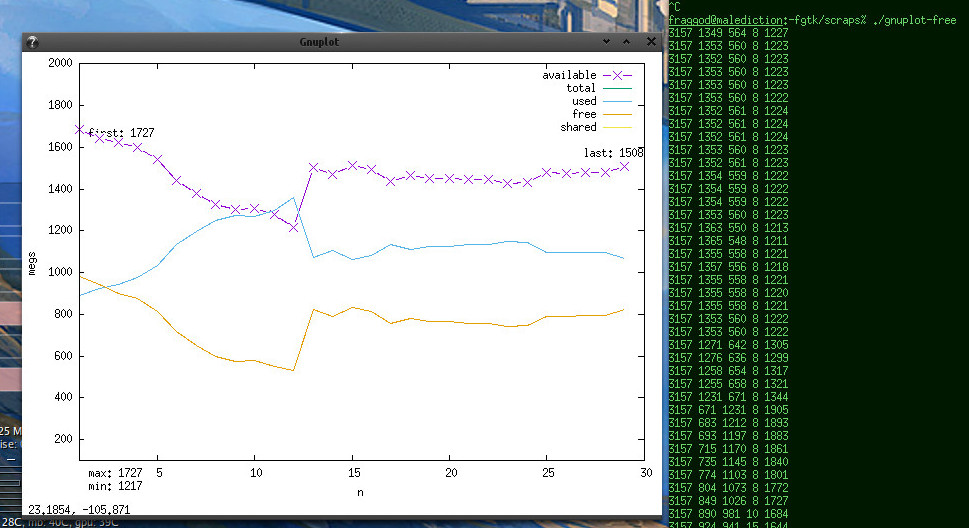
It updates smoothly, with line crawling left-to-right from the start and then
neatly flowing through. There's a lot of styling one can do to make it prettier,
but I think I've spent enough time on such a trivial thing.
Didn't really help much with debugging though. Oh well...
Full "free | awk | gnuplot" script is here on github.
Mar 11, 2015
Most Firefox addons add a toolbar button that does something when clicked, or
you can add such button by dragging it via Customize Firefox interface.
For example, I have a button for (an awesome) Column Reader extension on the
right of FF menu bar (which I have always-visible):

But as far as I can tell, most simple extensions don't bother with some custom
hotkey-adding interface, so there seem to be no obvious way to "click" that
button by pressing a hotkey.
In case of Column Reader, this is more important because pressing its button is
akin to "inspect element" in Firebug or FF Developer Tools - allows to pick any
box of text on the page, so would be especially nice to call via hotkey + click,
(as you'd do with Ctrl+Shift+C + click).
As I did struggle with binding hotkeys for specific extensions before (in their
own quirky ways), found one sure-fire way to do exactly what you'd get on click
this time - by simulating a click event itself (upon pressing the hotkey).
Whole process can be split into several steps:
Install Keyconfig or similar extension, allowing to bind/run arbitrary
JavaScript code on hotkeys.
One important note here is that such code should run in the JS context of the
extension itself, not just some page, as JS from page obviously won't be
allowed to send events to Firefox UI.
Keyconfig is very simple and seem to work perfectly for this purpose - just
"Add a new key" there and it'll pop up a window where any privileged JS can be
typed/pasted in.
Install DOM Inspector extension (from AMO).
This one will be useful to get button element's "id" (similar to DOM elements'
"id" attribute, but for XUL).
It should be available (probably after FF restart) under "Tools -> Web
Developer -> DOM Inspector".
Run DOM Inspector and find the element-to-be-hotkeyed there.
Under "File" select "Inspect Chrome Document" and first document there -
should update "URL bar" in the inspector window to
"chrome://browser/content/browser.xul".
Now click "Find a node by clicking" button on the left (or under "Edit ->
Select Element by Click"), and then just click on the desired UI
button/element - doesn't really have to be an extension button.
It might be necessary to set "View -> Document Viewer -> DOM Nodes" to see XUL
nodes on the left, if it's not selected already.
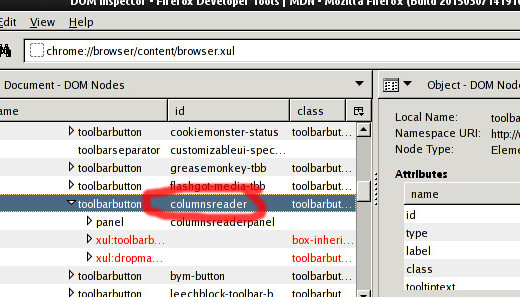
There it'd be easy to see all the neighbor elements and this button element.
Any element in that DOM Inspector frame can be right-clicked and there's
"Blink Element" option to show exactly where it is in the UI.
"id" of any box where click should land will do (highlighted with red in my
case on the image above).
Write/paste JavaScript that would "click" on the element into Keyconfig (or
whatever other hotkey-addon).
I did try HTML-specific ways to trigger events, but none seem to have worked
with XUL elements, so JS below uses nsIDOMWindowUtils XPCOM interface,
which seem to be designed specifically with such "simulation" stuff in mind
(likely for things like Selenium WebDriver).
JS for my case:
var el_box = document.getElementById('columnsreader').boxObject;
var domWindowUtils =
  window.QueryInterface(Components.interfaces.nsIInterfaceRequestor)
    .getInterface(Components.interfaces.nsIDOMWindowUtils);
domWindowUtils.sendMouseEvent('mousedown', el_box.x, el_box.y, 0, 1, 0);
domWindowUtils.sendMouseEvent('mouseup', el_box.x, el_box.y, 0, 1, 0);
"columnsreader" there is an "id" of an element-to-be-clicked, and should
probably be substituted for whatever else from the previous step.
There doesn't seem to be a "click" event, so "mousedown" + "mouseup" it is.
"0, 1, 0" stuff is: left button, single-click (not sure what it does here), no
modifiers.
If anything goes wrong in that JS, the usual "Tools -> Web Developer ->
Browser Console" (Ctrl+Shift+J) window should show errors.
It should be possible to adjust click position by adding/subtracting pixels
from el_box.x / el_box.y, but left-top corner seem to work fine for buttons.
Save time and frustration by not dragging stupid mouse anymore, using trusty
hotkey instead \o/
Wish there was some standard "click on whatever to bind it to specified
hotkey" UI option in FF (like there is in e.g.
Claws Mail), but haven't
seen one so far (FF 36).
Maybe someone should write addon for that!
Jan 30, 2015
Important: This way was pretty much made obsolete by Device Tree overlays,
which have returned (as expected) in 3.19 kernels - it'd probably be easier to
use these in most cases.
BeagleBone Black board has three i2c buses, two of which are available by
default on Linux kernel with patches from RCN (Robert Nelson).
There are plenty of links on how to enable i2c1 on old-ish (by now) 3.8-series
kernels, which had "Device Tree overlays" patches, but these do not apply to
3.9-3.18, though it looks like
they might make a comeback in the future
(LWN).
Probably it's just a bit too specific task to ask an easy answer for.
Overlays in pre-3.9 allowed to write a "patch" for a Device Tree, compile it and
then load it at runtime, which is not possible without these, but perfectly
possible and kinda-easy to do by compiling a dtb and loading it on boot.
It'd be great if there was a prebuilt dtb file in Linux with just i2c1 enabled
(not just for some cape, bundled with other settings), but unfortunately, as of
patched 3.18.4, there doesn't seem to be one, hence the following patching
process.
For that, getting the kernel sources (whichever were used to build the kernel,
ideally) is necessary.
In
Arch Linux ARM (which I tend to use with such boards), this can be done
by grabbing the
PKGBUILD dir, editing the "PKGBUILD" file, uncommenting the
"return 1" under "stop here - this is useful to configure the kernel" comment
and running
makepkg -sf (from "base-devel" package set on arch) there.
That will just unpack the kernel sources, put the appropriate .config file
there and run make prepare on them.
With kernel sources unpacked, the file that you'd want to patch is
"arch/arm/boot/dts/am335x-boneblack.dts" (or whichever other dtb you're
loading via uboot):
--- am335x-boneblack.dts.bak    2015-01-29 18:20:29.547909768 +0500
+++ am335x-boneblack.dts        2015-01-30 20:56:43.129213998 +0500
@@ -23,6 +23,14 @@
 };

 &ocp {
+       /* i2c */
+       P9_17_pinmux {
+               status = "disabled";
+       };
+       P9_18_pinmux {
+               status = "disabled";
+       };
+
        /* clkout2 */
        P9_41_pinmux {
                status = "disabled";
@@ -33,6 +41,13 @@
        };
 };

+&i2c1 {
+       status = "okay";
+       pinctrl-names = "default";
+       pinctrl-0 = <&i2c1_pins>;
+       clock-frequency = <100000>;
+};
+
 &mmc1 {
        vmmc-supply = <&vmmcsd_fixed>;
 };
Then "make dtbs" can be used to build dtb files only, and not the whole kernel
(which would take a while on BBB).
Resulting *.dtb (e.g. "am335x-boneblack.dtb" for "am335x-boneblack.dts", in the
same dir) can be put into "dtbs" on boot partition and loaded from uEnv.txt (or
whatever uboot configs are included from there).
Reboot, and i2cdetect -l should show i2c-1:
# i2cdetect -l
i2c-0   i2c             OMAP I2C adapter                    I2C adapter
i2c-1   i2c             OMAP I2C adapter                    I2C adapter
i2c-2   i2c             OMAP I2C adapter                    I2C adapter
As I've already mentioned before, this might not be the optimal way to enable
the thing in kernels 3.19 and beyond, if "device tree overlays" patches will
land there - it should be possible to just load some patch on-the-fly there,
without all the extra hassle described above.
Update 2015-03-19: Device Tree overlays landed in 3.19 indeed, but if
migrating to use these is too much hassle for now, here's a patch for
3.19.1-bone4 am335x-bone-common.dtsi to enable i2c1 and i2c2 on boot
(applies in the same way, make dtbs, copy am335x-boneblack.dtb to /boot/dtbs).