Jan 12, 2015
Needed to implement a thing that would react on USB Flash Drive inserted (into
autonomous BBB device) - to get device name, mount fs there, rsync stuff to it,
unmount.
To avoid whatever concurrency issues (i.e. multiple things screwing with device
in parallel), proper error logging and other startup things, most obvious thing
is to wrap the script in a systemd oneshot service.
Only non-immediately-obvious problem for me here was how to pass device to such
service properly.
With a bit of digging through google results (and even finding one post here
somehow among them), eventually found "Pairing udev's SYSTEMD_WANTS and
systemd's templated units" resolved thread, where what seem to be current-best
approach is specified.
Adapting it for my case and pairing with generic patterns for
device-instantiated services, resulted in the following configuration.
99-sync-sensor-logs.rules:
SUBSYSTEM=="block", ACTION=="add", ENV{ID_TYPE}="disk", ENV{DEVTYPE}=="partition",\
  PROGRAM="/usr/bin/systemd-escape -p --template=sync-sensor-logs@.service $env{DEVNAME}",\
  ENV{SYSTEMD_WANTS}+="%c"
sync-sensor-logs@.service:
[Unit]
BindTo=%i.device
After=%i.device

[Service]
Type=oneshot
TimeoutStartSec=300
ExecStart=/usr/local/sbin/sync-sensor-logs /%I
This makes things stop if it works for too long or if device vanishes (due to
BindTo=) and properly delays script start until device is ready.
"sync-sensor-logs" script at the end gets passed original unescaped device
name as an argument.
Does not need things like systemctl invocation or manual systemd escaping
re-implementation either, though running "systemd-escape" still seem to be
necessary evil there.
systemd-less alternative seem to be having a script that does per-device flock,
timeout logic and a lot more checks for whether device is ready and/or still
there, so this approach looks way saner and clearer, with a caveat that one
should probably be familiar with all these systemd features.
Dec 23, 2014
I've been using emacs for a while now, and always on a lookout for a features
that'd be nice to have there.
Accumulated quite a number of these in my emacs-setup repo as a result.
Most of these features start from ideas in other editors or tools (e.g. music
players, irc clients, etc - emacs seem to be best for a lot of stuff), or a
simplistic proof-of-concept implementation of something similar.
I usually add these to my emacs due to sheer fun of coding in lisps, compared
to pretty much any other lang family I know of.
Recently added two of these, and wanted to share/log the ideas here, in case
someone else might find these useful.
"Remote" based on emacsclient tool
As I use laptop and desktop machines for coding and procrastination
interchangeably, can have e.g. irc client (ERC - seriously the best irc client
I've seen by far) running on either of these.
But even with ZNC bouncer setup (and easy log-reading tools for it), it's
still a lot of hassle to connect to same irc from another machiine and catch-up
on chan history there.
Or sometimes there are unsaved buffer changes, or whatever other stuff
happening, or just stuff you want to do in a remote emacs instance, which would
be easy if you could just go turn on the monitor, shrug-off screen blanking,
sometimes disable screen-lock, then switch to emacs and press a few hotkeys
there... yeah, it doesn't look that easy even when I'm at home and close to the
thing.
emacs has "emacsclient" thing, that allows you to eval whatever elisp code on a
remote emacs instance, but it's impossible to use for such simple tasks without
some convenient wrappers.
And these remote invocation wrappers is what this idea is all about.
Consider terminal dump below, running in an ssh or over tcp to remote emacs
server (and I'd strongly suggest having (server-start) right in ~/.emacs,
though maybe not on tcp socket for security reasons):
% ece b
* 2014-12-23.a_few_recent_emacs_features_-_remote_and_file_colors.rst
  fg_remote.el
  rpc.py
* fg_erc.el
  utils.py
  #twitter_bitlbee
  #blazer
  #exherbo
  ...

% ece b remote
*ERROR*: Failed to uniquely match buffer by `remote', matches:
2014-12-23.a_few_recent_emacs_features_-_remote_and_file_colors.rst,
fg_remote.el

--- whoops... lemme try again

% ece b fg_rem
...(contents of the buffer, matched by unique name part)...

% ece erc
004 #twitter_bitlbee
004 #blazer
002 #bordercamp

--- Showing last (unchecked) irc activity, same as erc-track-mode does (but nicer)

% ece erc twitter | t
[13:36:45]<fijall> hint - you can use gc.garbage in Python to store any sort of ...
[14:57:59]<veorq> Going shopping downtown. Pray for me.
[15:48:59]<mitsuhiko> I like how if you google for "London Bridge" you get ...
[17:15:15]<simonw> TIL the Devonshire word "frawsy" (or is it "frawzy"?) - a ...
[17:17:04] *** -------------------- ***
[17:24:01]<veorq> RT @collinrm: Any opinions on VeraCrypt?
[17:33:31]<veorq> insightful comment by @jmgosney about the Ars Technica hack ...
[17:35:36]<veorq> .@jmgosney as you must know "iterating" a hash is in theory ...
[17:51:50]<veorq> woops #31c3 via @joernchen ...
~erc/#twitter_bitlbee%

--- "t" above is an alias for "tail" that I use in all shells, lines snipped jic

% ece h
Available commands:
  buffer (aliases: b, buff)
  buffer-names
  erc
  erc-mark
  get-socket-type
  help (aliases: h, rtfm, wat)
  log
  switch-sockets

% ece h erc-mark
(fg-remote-erc-mark PATTERN)

Put /mark to a specified ERC chan and reset its activity track.

--- Whole "help" thing is auto-generated, see "fg-remote-help" in fg_remote.el
And so on - anything is trivial to implement as elisp few-liner.
For instance, missing "buffer-save" command will be:
(defun fg-remote-buffer-save (pattern)
  "Saves specified bufffer, matched via `fg-get-useful-buffer'."
  (with-current-buffer (fg-get-useful-buffer pattern) (save-buffer)))
(defalias 'fg-remote-bs 'fg-remote-buffer-save)
Both "bufffer-save" command and its "bs" alias will instantly appear in "help"
and be available for calling via emacs client.
Hell, you can "implement" this stuff from terminal and eval on a remote emacs
(i.e. just pass code above to emacsclient -e), extending its API in an
ad-hoc fashion right there.
"ece" script above is a thin wrapper around "emacsclient" to avoid typing that
long binary name and "-e" flag with a set of parentheses every time, can be
found in the root of emacs-setup repo.
So it's easier to procrastinate in bed whole morning with a laptop than ever.
Yup, that's the real point of the whole thing.
Unique per-file buffer colors
Stumbled upon this idea in a deliberate-software blog entry recently.
There, author suggests making static per-code-project colors, but I thought -
why not have slight (and automatic) per-file-path color alterations for buffer
background?
Doing that makes file buffers (or any non-file ones too) recognizable, i.e. you
don't need to look at the path or code inside anymore to instantly know that
it's that exact file you want (or don't want) to edit - eye/brain picks it up
automatically.
emacs' color.el already has all the cool stuff for colors - tools for conversion
to/from L*a*b* colorspace (humane "perceptual" numbers), CIEDE2000 color
diffs (JUST LOOK AT THIS THING), and so on - easy to use these for the
task.
Result is "fg-color-tweak" function that I now use for slight changes to buffer
bg, based on md5 hash of the file path and reliably-contrast irc nicknames
(based also on the hash, used way worse and unreliable "simple" thing for this
in the past):
(fg-color-tweak COLOR &optional SEED MIN-SHIFT MAX-SHIFT (CLAMP-RGB-AFTER 20)
  (LAB-RANGES ...))

Adjust COLOR based on (md5 of-) SEED and MIN-SHIFT / MAX-SHIFT lists.

COLOR can be provided as a three-value (0-1 float)
R G B list, or a string suitable for `color-name-to-rgb'.

MIN-SHIFT / MAX-SHIFT can be:
 * three-value list (numbers) of min/max offset on L*a*b* in either direction
 * one number - min/max cie-de2000 distance
 * four-value list of offsets and distance, combining both options above
 * nil for no-limit

SEED can be number, string or nil.
Empty string or nil passed as SEED will return the original color.

CLAMP-RGB-AFTER defines how many attempts to make in picking
L*a*b* color with random offset that translates to non-imaginary sRGB color.
When that number is reached, last color will be `color-clamp'ed to fit into sRGB.

Returns color plus/minus offset as a hex string.
Resulting color offset should be uniformly distributed between min/max shift limits.
It's a bit complicated under the hood, parsing all the options and limits,
making sure resulting color is not "imaginary" L*a*b* one and converts to RGB
without clamping (if possible), while maintaining requested min/max distances,
doing several hashing rounds if necessary, with fallbacks... etc.
Actual end-result is simple though - deterministic and instantly-recognizable
color-coding for anything you can think of - just pass the attribute to base
coding on and desired min/max contrast levels, get back the hex color to use,
apply it.
Should you use something like that, I highly suggest taking a moment to look
at L*a*b* and HSL color spaces, to understand how colors can be easily tweaked
along certain parameters.
For example, passing '(0 a b) as min/max-shift to the function above will
produce color variants with the same "lightness", which is super-useful to
control, making sure you won't ever get out-of-whack colors for
e.g. light/dark backgrounds.
To summarize...
Coding lispy stuff is super-fun, just for the sake of it ;)
Actually, speaking of fun, I can't recommend installing magnars'
s.el and
dash.el right now highly enough, unless you have these already.
They make coding elisp stuff so much more fun and trivial, to a degree that'd
be hard to describe, so please at least try coding somethig with these.
All the stuff mentioned above is in (also linked here already) emacs-setup repo.
Cheers!
Oct 05, 2014
Experimenting with all kinds of arm boards lately (nyms above stand for
Raspberry Pi, Beaglebone Black and Cubieboard), I can't help but feel a bit
sorry of microsd cards in each one of them.
These are even worse for non-bulk writes than SSD, having less erase cycles plus
larger blocks, and yet when used for all fs needs of the board, even typing "ls"
into shell will usually emit a write (unless shell doesn't keep history, which
sucks).
Great explaination of how they work can be found on LWN (as usual).
Easy and relatively hassle-free way to fix the issue is to use aufs, but as
doing it for the whole rootfs requires initramfs (which is not needed here
otherwise), it's a lot easier to only use it for commonly-writable parts -
i.e. /var and /home in most cases.
Home for "root" user is usually /root, so to make it aufs material as well, it's
better to move that to /home (which probably shouldn't be a separate fs on these
devices), leaving /root as a symlink to that.
It seem to be impossible to do when logged-in as /root (mv will error with
EBUSY), but trivial from any other machine:
# mount /dev/sdb2 /mnt # mount microsd
# cd /mnt
# mv root home/
# ln -s home/root
# cd
# umount /mnt
As aufs2 is already built into Arch Linux ARM kernel, only thing that's left is
to add early-boot systemd unit for mounting it,
e.g. /etc/systemd/system/aufs.service:
[Unit]
DefaultDependencies=false

[Install]
WantedBy=local-fs-pre.target

[Service]
Type=oneshot
RemainAfterExit=true

# Remount /home and /var as aufs
ExecStart=/bin/mount -t tmpfs tmpfs /aufs/rw
ExecStart=/bin/mkdir -p -m0755 /aufs/rw/var /aufs/rw/home
ExecStart=/bin/mount -t aufs -o br:/aufs/rw/var=rw:/var=ro none /var
ExecStart=/bin/mount -t aufs -o br:/aufs/rw/home=rw:/home=ro none /home

# Mount "pure" root to /aufs/ro for syncing changes
ExecStart=/bin/mount --bind / /aufs/ro
ExecStart=/bin/mount --make-private /aufs/ro
And then create the dirs used there and enable unit:
# mkdir -p /aufs/{rw,ro}
# systemctl enable aufs
Now, upon rebooting the board, you'll get aufs mounts for /home and /var, making
all the writes there go to respective /aufs/rw dirs on tmpfs while allowing to
read all the contents from underlying rootfs.
To make sure systemd doesn't waste extra tmpfs space thinking it can sync logs
to /var/log/journal, I'd also suggest to do this (before rebooting with aufs
mounts):
# rm -rf /var/log/journal
# ln -s /dev/null /var/log/journal
Can also be done via journald.conf with Storage=volatile.
One obvious caveat with aufs is, of course, how to deal with things that do
expect to have permanent storage in /var - examples can be a pacman (Arch
package manager) on system updates, postfix or any db.
For stock Arch Linux ARM though, it's only pacman on manual updates.
And depending on the app and how "ok" can loss of this data might be, app dir
in /var (e.g. /var/lib/pacman) can be either moved + symlinked to /srv or synced
before shutdown or after it's done with writing (for manual oneshot apps like
pacman).
For moving stuff back to permanent fs, aubrsync from aufs2-util.git can be
used like this:
# aubrsync move /var/ /aufs/rw/var/ /aufs/ro/var/
As even pulling that from shell history can be a bit tedious, I've made a
simpler ad-hoc wrapper - aufs_sync - that can be used (with mountpoints
similar to presented above) like this:
# aufs_sync
Usage: aufs_sync { copy | move | check } [module]
Example (flushes /var): aufs_sync move var

# aufs_sync check
/aufs/rw
/aufs/rw/home
/aufs/rw/home/root
/aufs/rw/home/root/.histfile
/aufs/rw/home/.wh..wh.orph
/aufs/rw/home/.wh..wh.plnk
/aufs/rw/home/.wh..wh.aufs
/aufs/rw/var
/aufs/rw/var/.wh..wh.orph
/aufs/rw/var/.wh..wh.plnk
/aufs/rw/var/.wh..wh.aufs
--- ... just does "find /aufs/rw"

# aufs_sync move
--- does "aubrsync move" for all dirs in /aufs/rw
Just be sure to check if any new apps might write something important there
(right after installing these) and do symlinks (to something like /srv) for
their dirs, as even having "aufs_sync copy" on shutdown definitely won't prevent
data loss for these on e.g. sudden power blackout or any crashes.
Sep 23, 2014
Update 2015-11-08: No longer necessary (or even supported in 2.1) - tmux'
new "backoff" rate-limiting approach works like a charm with defaults \o/
Had the issue of spammy binary locking-up terminal for a long time, but never
bothered to do something about it... until now.
Happens with any terminal I've seen - just run something like this in the shell
there:
# for n in {1..500000}; do echo "$spam $n"; done
And for at least several seconds, terminal is totally unresponsive, no matter
how many
screen's /
tmux'es are running there.
It's usually faster to kill term window via WM and re-attach to whatever was
inside from a new one.
xterm seem to be one of the most resistant *terms to this, e.g. terminology -
much less so, which I guess just means that it's more fancy and hence slower to
draw millions of output lines.
Anyhow, tmuxrc magic:
set -g c0-change-trigger 150
set -g c0-change-interval 100
"man tmux" says that 250/100 are defaults, but it doesn't seem to be true, as
just setting these "defaults" explicitly here fixes the issue, which exists with
the default configuration.
Fix just limits rate of tmux output to basically 150 newlines (which is like
twice my terminal height anyway) per 100 ms, so xterm won't get overflown with
"rendering megs of text" backlog, remaining apparently-unresponsive (to any
other output) for a while.
Since I always run tmux as a top-level multiplexer in xterm, totally solved the
annoyance for me.
Just wish I've done that much sooner - would've saved me a lot of time and
probably some rage-burned neurons.
Jul 16, 2014
Tried to find any simple script to update tinydns (part of djbdns) zones
that'd be better than ssh dns_update@remote_host update.sh, but failed -
they all seem to be hacky php scripts, doomed to run behind httpds, send
passwords in url, query random "myip" hosts or something like that.
What I want instead is something that won't be making http, tls or ssh
connections (and stirring all the crap behind these), but would rather just send
udp or even icmp pings to remotes, which should be enough for update, given
source IPs of these packets and some authentication payload.
So yep, wrote my own scripts for that - tinydns-dynamic-dns-updater project.
Tool sends UDP packets with 100 bytes of "( key_id || timestamp ) ||
Ed25519_sig" from clients, authenticating and distinguishing these
server-side by their signing keys ("key_id" there is to avoid iterating over
them all, checking which matches signature).
Server zone files can have "# dynamic: ts key1 key2 ..." comments before records
(separated from static records after these by comments or empty lines), which
says that any source IPs of packets with correct signatures (and more recent
timestamps) will be recorded in A/AAAA records (depending on source AF) that
follow instead of what's already there, leaving anything else in the file
intact.
Zone file only gets replaced if something is actually updated and it's possible
to use dynamic IP for server as well, using dynamic hostname on client (which is
resolved for each delayed packet).
Lossy nature of UDP can be easily mitigated by passing e.g. "-n5" to the client
script, so it'd send 5 packets (with exponential delays by default, configurable
via --send-delay), plus just having the thing on fairly regular intervals in
crontab.
Putting server script into socket-activated systemd service file also makes all
daemon-specific pains like using privileged ports (and most other
security/access things), startup/daemonization, restarts, auto-suspend timeout
and logging woes just go away, so there's --systemd flag for that too.
Given how easy it is to run djbdns/tinydns instance, there really doesn't seem
to be any compelling reason not to use your own dynamic dns stuff for every
single machine or device that can run simple python scripts.
Github link: tinydns-dynamic-dns-updater
Jun 15, 2014
Finally got around to installing
Steam platform to a desktop linux machine.
Been using Win7 instance here for games before, but as another fan in my
laptop died, have been too lazy to reboot into dedicated games-os here.
Given that Steam is a closed-source proprietary DRM platform for mass software
distribution, it seem to be either an ideal malware spread vector or just a
recipie for disaster, so of course not keen on giving it any access in a
non-dedicated os.
I also feel a bit guilty on giving the thing any extra PR, as it's the worst
kind of always-on DRM crap in principle, and already pretty much monopolized
PC Gaming market.
These days even many game critics push for filtering and essentially abuse of
that immense leverage - not a good sign at all.
To its credit, of course, Steam is nice and convenient to use, as such things
(e.g. google, fb, droids, apple, etc) tend to be.
So, isolation:
To avoid having Steam and any games anywhere near $HOME, giving it separate
UID is a good way to go.
That should also allow for it to run in a separate desktop session - i.e. have
its own cgroup, to easily contain, control and set limits for games:
% loginctl user-status steam
steam (1001)
  Since: Sun 2014-06-15 18:40:34 YEKT; 31s ago
  State: active
  Sessions: *7
    Unit: user-1001.slice
          └─session-7.scope
            ├─7821 sshd: steam [priv]
            ├─7829 sshd: steam@notty
            ├─7830 -zsh
            ├─7831 bash /usr/bin/steam
            ├─7841 bash /home/steam/.local/share/Steam/steam.sh
            ├─7842 tee /tmp/dumps/steam_stdout.txt
            ├─7917 /home/steam/.local/share/Steam/ubuntu12_32/steam
            ├─7942 dbus-launch --autolaunch=e52019f6d7b9427697a152348e9f84ad ...
            └─7943 /usr/bin/dbus-daemon --fork --print-pid 5 ...
AppArmor should allow to further isolate processes from having any access
beyond what's absolutely necessary for them to run, warn when these try to do
strange things and allow to just restrict these from doing outright stupid
things.
Given separate UID and cgroup, network access from all Steam apps can be
easily controlled via e.g. iptables, to avoid Steam and games scanning and
abusing other things in LAN, for example.
Creating steam user should be as simple as useradd steam, but then switching
to that UID from within a running DE should still allow it to access same X
server and start systemd session for it, plus not have any extra env,
permissions, dbus access, fd's and such from the main session.
By far the easiest way to do that I've found is to just ssh
steam@localhost, putting proper pubkey into ~steam/.ssh/authorized_keys
first, of course.
That should ensure that nothing leaks from DE but whatever ssh passes, and
it's rather paranoid security-oriented tool, so can be trusted with that .
It should allow to both bootstrap and install stuff as well as run it, yet
don't allow steam to poke too much into other shared dirs or processes.
To allow access to X, xhost or ~/.Xauthority cookie can be used along with some
extra env in e.g. ~/.zshrc:
export DISPLAY=':1.0'
In similar to ssh fashion, I've used pulseaudio network streaming to main DE
sound daemon on localhost for sound (also in ~/.zshrc):
export PULSE_SERVER='{e52019f6d7b9427697a152348e9f84ad}tcp6:malediction:4713'
export PULSE_COOKIE="$HOME"/.pulse-cookie
(I have pulse network streaming setup anyway, for sharing sound from desktop to
laptop - to e.g. play videos on a big screen there yet hear sound from laptop's
headphones)
Running Steam will also start its own dbus session (maybe it's pulse client lib
doing that, didn't check), but it doesn't seem to be used for anything, so there
seem to be no need to share it with main DE.
That should allow to start Steam after ssh'ing to steam@localhost, but process
can be made much easier (and more foolproof) with e.g. ~/bin/steam as:
#!/bin/bash

cmd=$1
shift

steam_wait_exit() {
  for n in {0..10}; do
    pgrep -U steam -x steam >/dev/null || return 0
    sleep 0.1
  done
  return 1
}

case "$cmd" in
  '')
    ssh steam@localhost <<EOF
source .zshrc
exec steam "$@"
EOF
    loginctl user-status steam ;;

  s*) loginctl user-status steam ;;

  k*)
    steam_exited=
    pgrep -U steam -x steam >/dev/null
    [[ $? -ne 0 ]] && steam_exited=t
    [[ -z "$steam_exited" ]] && {
      ssh steam@localhost <<EOF
source .zshrc
exec steam -shutdown
EOF
      steam_wait_exit
      [[ $? -eq 0 ]] && steam_exited=t
    }
    sudo loginctl kill-user steam
    [[ -z "$steam_exited" ]] && {
      steam_wait_exit || sudo loginctl -s KILL kill-user steam
    } ;;

  *) echo >&2 "Usage: $(basename "$0") [ status | kill ]"
esac
Now just steam in the main DE will run the thing in its own $HOME.
For further convenience, there's steam status and steam kill to easily
monitor or shutdown running Steam session from the terminal.
Note the complicated shutdown thing - Steam doesn't react to INT or TERM signals
cleanly, passing these to the running games instead, and should be terminated
via its own cli option (and the rest can then be killed-off too).
With this setup, iptables rules for outgoing connections can use user-slice
cgroup match (in 3.14 at least) or -m owner --uid-owner steam matches for
socket owner uid.
The only non-WAN things Steam connects to here are DNS servers and
aforementioned pulseaudio socket on localhost, the rest can be safely
firewalled.
Finally, running KSP there on Exherbo, I quickly discovered that sound libs
and plugins - alsa and pulse - in ubuntu "runtime" steam bootstrap setups don't
work well - either there's no sound or game fails to load at all.
Easy fix is to copy the runtime it uses (32-bit one for me) and cleanup alien
stuff from there for what's already present in the system, i.e.:
% cp -R .steam/bin32/steam-runtime my-runtime
% find my-runtime -type f\
  \( -path '*asound*' -o -path '*alsa*' -o -path '*pulse*' \) -delete
And then add something like this to ~steam/.zshrc:
steam() { STEAM_RUNTIME="$HOME"/my-runtime command steam "$@"; }
That should keep all of the know-working Ubuntu libs that steam bootsrap gets
away from the rest of the system (where stuff like Mono just isn't needed, and
others will cause trouble) while allowing to remove any of them from the runtime
to use same thing in the system.
And yay - Kerbal Space Program seem to work here way faster than on Win7.

May 19, 2014
Conky sure has a ton of sensor-related hw-monitoring options, but it still
doesn't seem to be enough to represent even just the temperatures from this
"sensors" output:
atk0110-acpi-0
Adapter: ACPI interface
Vcore Voltage:      +1.39 V  (min =  +0.80 V, max =  +1.60 V)
+3.3V Voltage:      +3.36 V  (min =  +2.97 V, max =  +3.63 V)
+5V Voltage:        +5.08 V  (min =  +4.50 V, max =  +5.50 V)
+12V Voltage:      +12.21 V  (min = +10.20 V, max = +13.80 V)
CPU Fan Speed:     2008 RPM  (min =  600 RPM, max = 7200 RPM)
Chassis Fan Speed:    0 RPM  (min =  600 RPM, max = 7200 RPM)
Power Fan Speed:      0 RPM  (min =  600 RPM, max = 7200 RPM)
CPU Temperature:    +42.0°C  (high = +60.0°C, crit = +95.0°C)
MB Temperature:     +43.0°C  (high = +45.0°C, crit = +75.0°C)

k10temp-pci-00c3
Adapter: PCI adapter
temp1:        +30.6°C  (high = +70.0°C)
                       (crit = +90.0°C, hyst = +88.0°C)

radeon-pci-0400
Adapter: PCI adapter
temp1:        +51.0°C
Given the summertime, and faulty noisy cooling fans, decided that it'd be nice
to be able to have an idea about what kind of temperatures hw operates on under
all sorts of routine tasks.
Conky is extensible via lua, which - among other awesome things there are -
allows to code caches for expensive operations (and not just repeat them every
other second) and parse output of whatever tools efficiently (i.e. without
forking five extra binaries plus perl).
Output of "sensors" though not only is kinda expensive to get, but also hardly
parseable, likely unstable, and tool doesn't seem to have any "machine data"
option.
lm_sensors includes a libsensors, which still doesn't seem possible to call
from conky-lua directly (would need some kind of ffi), but easy to write the
wrapper around - i.e. this sens.c 50-liner, to dump info in a useful way:
atk0110-0-0__in0_input 1.392000
atk0110-0-0__in0_min 0.800000
atk0110-0-0__in0_max 1.600000
atk0110-0-0__in1_input 3.360000
...
atk0110-0-0__in3_max 13.800000
atk0110-0-0__fan1_input 2002.000000
atk0110-0-0__fan1_min 600.000000
atk0110-0-0__fan1_max 7200.000000
atk0110-0-0__fan2_input 0.000000
...
atk0110-0-0__fan3_max 7200.000000
atk0110-0-0__temp1_input 42.000000
atk0110-0-0__temp1_max 60.000000
atk0110-0-0__temp1_crit 95.000000
atk0110-0-0__temp2_input 43.000000
atk0110-0-0__temp2_max 45.000000
atk0110-0-0__temp2_crit 75.000000
k10temp-0-c3__temp1_input 31.500000
k10temp-0-c3__temp1_max 70.000000
k10temp-0-c3__temp1_crit 90.000000
k10temp-0-c3__temp1_crit_hyst 88.000000
radeon-0-400__temp1_input 51.000000
It's all lm_sensors seem to know about hw in a simple key-value form.
Still not keen on running that on every conky tick, hence the lua cache:
sensors = {
  values=nil,
  cmd="sens",
  ts_read_i=120, ts_read=0,
}

function conky_sens_read(name, precision)
  local ts = os.time()
  if os.difftime(ts, sensors.ts_read) > sensors.ts_read_i then
    local sh = io.popen(sensors.cmd, 'r')
    sensors.values = {}
    for p in string.gmatch(sh:read('*a'), '(%S+ %S+)\n') do
      local n = string.find(p, ' ')
      sensors.values[string.sub(p, 0, n-1)] = string.sub(p, n)
    end
    sh:close()
    sensors.ts_read = ts
  end

  if sensors.values[name] then
    local fmt = string.format('%%.%sf', precision or 0)
    return string.format(fmt, sensors.values[name])
  end
  return ''
end
Which can run the actual "sens" command every 120s, which is perfectly fine with
me, since I don't consider conky to be an "early warning" system, and more of an
"have an idea of what's the norm here" one.
Config-wise, it'd be just cpu temp: ${lua sens_read atk0110-0-0__temp1_input}C,
or a more fancy template version with a flashing warning and hidden for missing
sensors:
template3 ${color lightgrey}${if_empty ${lua sens_read \2}}${else}\
${if_match ${lua sens_read \2} > \3}${color red}\1: ${lua sens_read \2}C${blink !!!}\
${else}\1: ${color}${lua sens_read \2}C${endif}${endif}
It can then be used simply as ${template3 cpu atk0110-0-0__temp1_input 60}
or ${template3 gpu radeon-0-400__temp1_input 80}, with 60 and 80 being
manually-specified thresholds beyond which indicator turns red and has blinking
"!!!" to get more attention.
Overall result in my case is something like this:
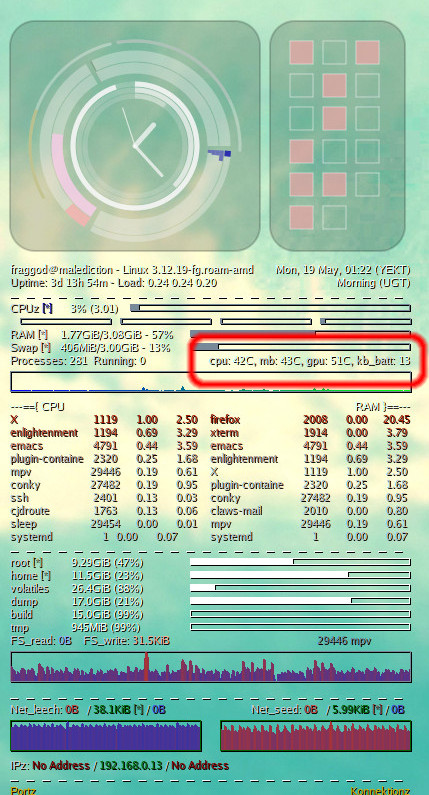
sens.c (plus Makefile with gcc -Wall -lsensors for it) and my conky config
where it's utilized can be all found in de-setup repo on github (or my git
mirror, ofc).
May 18, 2014
Just had an epic moment wrt how to fail at kinda-basic math, which seem to be
quite representative of how people fail wrt homebrew crypto code (and what
everyone and their mom warn against).
So, anyhow, on a d3 vis, I wanted to get a pseudorandom colors for text blobs,
but with reasonably same luminosity on HSL scale (Hue - Saturation -
Luminosity/Lightness/Level), so that changing opacity on light/dark bg can be
seen clearly as a change of L in the resulting color.
There are text items like (literally, in this example) "thing1", "thing2",
"thing3" - these should have all distinct and constant colors, ideally.
So how do you pick H and S components in HSL from a text tag?
Just use hash, right?
As JS doesn't have any hashes yet (
WebCryptoAPI is in the works) and I don't
really need "crypto" here, just some str-to-num shuffler for color, decided
that I might as well just roll out simple one-liner non-crypto hash func
implementation.
There are plenty of those around, e.g.
this list.
Didn't want much bias wrt which range of colors get picked, so there are these
test results - link1, link2 - wrt how these functions work, e.g. performance
and distribution of output values over uint32 range.
Picked random "ok" one - Ly hash, with fairly even output distribution,
implemented as this:
hashLy_max = 4294967296 # uint32
hashLy = (str, seed=0) ->
  for n in [0..(str.length-1)]
    c = str.charCodeAt(n)
    while c > 0
      seed = ((seed * 1664525) + (c & 0xff) + 1013904223) % hashLy_max
      c >>= 8
  seed
c >>= 8 line and internal loop here because JS has unicode strings, so it's
a trivial (non-standard) encoding.
But given any "thing1" string, I need two 0-255 values: H and S, not one
0-(2^32-1).
So let's map output to a 0-255 range and just call it twice:
hashLy_chain = (str, count=2, max=255) ->
  [hash, hashes] = [0, []]
  scale = d3.scale.linear()
    .range([0, max]).domain([0, hashLy_max])
  for n in [1..count]
    hash = hashLy(str, hash)
    hashes.push(scale(hash))
  hashes
Note how to produce second hash output "hashLy" just gets called with "seed"
value equal to the first hash - essentially hash(hash(value) || value).
People do that with md5, sha*, and their ilk all the time, right?
Getting the values from this func, noticed that they look kinda non-random at
all, which is not what I came to expect from hash functions, quite used to
dealing crypto hashes, which are really easy to get in any lang but JS.
So, sure, given that I'm playing around with d3 anyway, let's just plot the
outputs:

"Wat?... Oh, right, makes sense."
Especially with sequential items, it's hilarious how non-random, and even
constant the output there is.
And it totally makes sense, of course - it's just a "k1*x + x + k2" function.
It's meant for hash tables, where seq-in/seq-out is fine, and the results in
"chain(3)[0]" and "chain(3)[1]" calls are so close on 0-255 that they map to the
same int value.
Plus, of course, the results are anything but "random-looking", even for
non-sequential strings of d3.scale.category20() range.
Lession learned - know what you're dealing with, be super-careful rolling your
own math from primitives you don't really understand, stop and think about wth
you're doing for a second - don't just rely on "intuition" (associated with e.g.
"hash" word).
Now I totally get how people start with AES and SHA1 funcs, mix them into their
own crypto protocol and somehow get something analogous to ROT13 (or even
double-ROT13, for extra hilarity) as a result.
May 12, 2014
As I was working on a small d3-heavy project (my weird firefox homepage), I
did use d3 scales for things like opacity of the item, depending on its
relevance, and found these a bit counter-intuitive, but with no
readily-available demo (i.e. X-Y graphs of scales with same fixed domain/range)
on how they actually work.
Basically, I needed this:

I'll be first to admit that I'm no data scientist and not particulary good at
math, but from what memories on the subject I have, intuition tells me that
e.g. "d3.scale.pow().exponent(4)" should rise waaaay faster from the very start
than "d3.scale.log()", but with fixed domain + range values, that's exactly the
opposite of truth!
So, a bit confused about weird results I was getting, just wrote a simple
script to plot these charts for all basic d3 scales.
And, of course, once I saw a graph, it's fairly clear how that works.
Here, it's obvious that if you want to pick something that mildly favors higher
X values, you'd pick pow(2), and not sqrt.
Feel like such chart should be in the docs, but don't feel qualified enough to
add it, and maybe it's counter-intuitive just for me, as I don't dabble with
data visualizations much and/or might be too much of a visually inclined person.
In case someone needs the script to do the plotting (it's really trivial
though): scales_graph.zip
May 12, 2014
Wanted to have some sort of "homepage with my fav stuff, arranged as I want to"
in firefox for a while, and finally got resolve to do something about it - just
finished a (first version of) script to generate the thing -
firefox-homepage-generator.
Default "grid of page screenshots" never worked for me, and while there are
other projects that do other layouts for different stuff, they just aren't
flexible enough to do whatever horrible thing I want.
In this particular case, I wanted to experiment with chaotic tag cloud of
bookmarks (so they won't ever be in the same place), relations graph for these
tags and random picks for "links to read" from backlog.
Result is a dynamic d3 + d3.layout.cloud (interactive example of this
layout) page without much style:
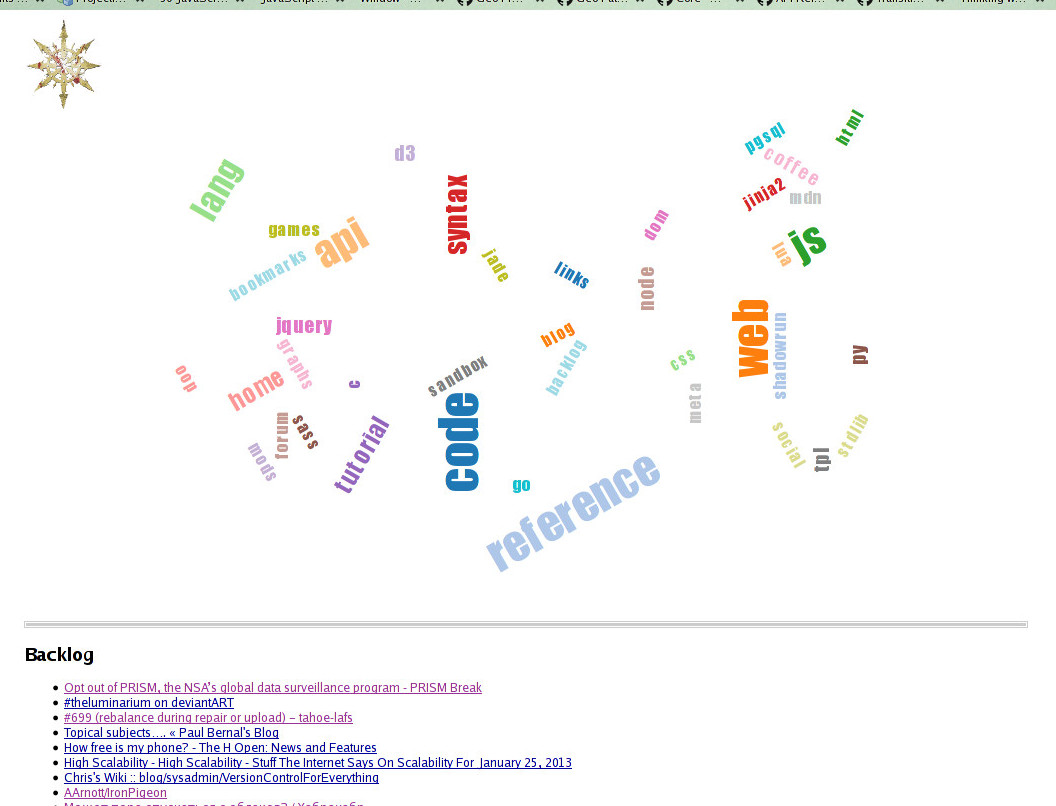
"Mark of Chaos" button in the corner can fly/re-pack tags around.
Clicking tag shows bookmarks tagged as such and fades all other tags out in
proportion to how they're related to the clicked one (i.e. how many links
share the tag with others).
Started using FF bookmarks again in a meaningful way only recently, so not much
stuff there yet, but it does seem to help a lot, especially with these handy
awesome bar tricks.
Not entirely sure how useful the cloud visualization or actually having a
homepage would be, but it's a fun experiment and a nice place to collect any
useful web-surfing-related stuff I might think of in the future.
Repo link: firefox-homepage-generator