Apr 08, 2013
As discordian folk celebrated Jake Day yesterday, decided that I've had it
with random hanging userspace state-machines, stuck forever with tcp connections
that are not legitimately dead, just waiting on both sides.
And since pretty much every tool can handle transient connection failures and
reconnects, decided to come up with some simple and robust-enough solution to
break such links without (or rather before) patching all the apps to behave.
One last straw was davfs2 failing after a brief net-hiccup, with my options
limited to killing everything that uses (and is hanging dead on) its mount,
then going kill/remount way.
As it uses stateless http connections, I bet it's not even an issue for it to
repeat whatever request it tried last and it sure as hell handles network
failures, just not well in all cases.
I've used such technique to test some twisted-things in the past, so it was easy
to dig scapy-automata code for doing that, though the real trick is not to
craft/send FIN or RST packet, but rather to guess TCP seq/ack numbers to stamp
it with.
Alas, none of the existing tools (e.g. tcpkill) seem to do anything clever in
this regard.
cutter states that
There is a feature of the TCP/IP protocol that we could use to good effect
here - if a packet (other than an RST) is received on a connection that has
the wrong sequence number, then the host responds by sending a corrective
"ACK" packet back.
But neither the tool itself nor the technique described seem to work, and I
actually failed to find (or recall) any mentions (or other uses) of such
corrective behavior. Maybe it was so waaay back, dunno.
Naturally, as I can run such tool on the host where socket endpoint is, local
kernel has these numbers stored, but apparently no one really cared (or had a
legitimate enough use-case) to expose these to the userspace... until very
recently, that is.
Recent work of Parallels folks on
CRIU landed
getsockopt(sk, SOL_TCP,
TCP_QUEUE_SEQ, ...) in one the latest mainline kernel releases.
Trick is then just to run that syscall in the pid that holds the socket fd,
which looks like a trivial enough task, but looking over
crtools (which
unfortunately doesn't seem to work with vanilla kernel yet) and
ptrace-parasite tricks of compiling and injecting shellcode, decided that
it's just too much work for me, plus they share the same x86_64-only codebase,
and I'd like to have the thing working on ia32 machines as well.
Caching all the "seen" seq numbers in advance looks tempting, especially since
for most cases, relevant traffic is processed already by
nflog-zmq-pcap-pipe and
Snort, which can potentially dump
"(endpoint1-endpoint2, seq, len)" tuples to some fast key-value backend.
Invalidation of these might be a minor issue, but I'm not too thrilled about
having some dissection code to pre-cache stuff that's already cached in every
kernel anyway.
Patching kernel to just expose stuff via /proc looks like bit of a burden as
well, though an isolated module code would probably do the job well.
Weird that there doesn't seem to be one of these around already, closest one
being tcp_probe.c code, which hooks into tcp_recv code-path and doesn't really
get seqs without some traffic either.
One interesting idea that got my attention and didn't require a single line of
extra code was proposed on the local xmpp channel - to use tcp keepalives.
Sure, they won't make kernel drop connection when it's userspace that hangs on
both ends, with connection itself being perfectly healthy, but every one of
these carries a seq number that can be spoofed and used to destroy that
"healthy" state.
Pity these are optional and can't be just turned on for all sockets system-wide
on linux (unlike some BSD systems, apparently), and nothing uses these much by
choice (which can be seen in netstat --timer).
Luckily, there's a dead-simple LD_PRELOAD code of
libkeepalive which can be
used to enforce system-wide opt-out behavior for these (at least for
non-static binaries).
For suid stuff (like mount.davfs, mentioned above), it has to be in
/etc/ld.so.preload, not just env, but as I need it "just in case" for all the
connections, that seems fine in my case.
And tuning keepalives to be frequent-enough seem to be a no-brainer and
shouldn't have any effect on 99% of legitimate connections at all, as they
probably pass some traffic every other second, not after minutes or hours.
net.ipv4.tcp_keepalive_time = 900
net.ipv4.tcp_keepalive_probes = 5
net.ipv4.tcp_keepalive_intvl = 156
(default is to send empty keepalive packet after 2 hours of idleness)
With that, tool has to run ~7 min on average to kill any tcp connection in the
system, which totally acceptable, and no fragile non-portable ptrace-shellcode
magic involved (at least yet, I bet it'd be much easier to do in the future).
Code and some docs for the tool/approach can be found on github.
More of the same (update 2013-08-11):
Actually, lacking some better way to send RST/FIN from a machine to itself than
swapping MACs (and hoping that router is misconfigured enough to bounce packet
"from itself" back) or "-j REJECT --reject-with tcp-reset" (plus a "recent"
match or transient-port matching, to avoid blocking reconnect as well),
countdown for a connection should be ~7 + 15 min, as only next keepalive will
reliably produce RST response.
With a bit of ipset/iptables/nflog magic, it was easy to make the one-time
REJECT rule, snatching seq from dropped packet via NFLOG and using that to
produce RST for the other side as well.
Whole magic there goes like this:
-A conn_cutter ! -p tcp -j RETURN
-A conn_cutter -m set ! --match-set conn_cutter src,src -j RETURN
-A conn_cutter -p tcp -m recent --set --name conn_cutter --rsource
-A conn_cutter -p tcp -m recent ! --rcheck --seconds 20\
        --hitcount 2 --name conn_cutter --rsource -j NFLOG
-A conn_cutter -p tcp -m recent ! --rcheck --seconds 20\
        --hitcount 2 --name conn_cutter --rsource -j REJECT --reject-with tcp-reset

-I OUTPUT -j conn_cutter
"recent" matcher there is a bit redundant in most cases, as outgoing connections
usually use transient-range tcp ports, which shouldn't match for different
attempts, but some apps might bind these explicitly.
ipset turned out to be quite a neat thing to avoid iptables manipulations (to
add/remove match).
It's interesting that this set of rules handles RST to both ends all by itself
if packet arrives from remote first - response (e.g. ACK) from local socket will
get RST but won't reach remote, and retransmit from remote will get RST because
local port is legitimately closed by then.
Current code allows to optionally specify ipset name, whether to use nflog
(via spin-off scapy-nflog-capture driver) or raw sockets, and doesn't do any
mac-swapping, only sending RST to remote (which, again, should still be
sufficient with frequent-enough keepalives).
Now, if only some decade-old undocumented code didn't explicitly disable these
nice keepalives...
Apr 06, 2013
Everyone is probably aware that bits do flip here and there in the supposedly
rock-solid, predictable and deterministic hardware, but somehow every single
data-management layer assumes that it's not its responsibility to fix or even
detect these flukes.
Bitrot in RAM is a known source of bugs, but short of ECC, dunno what one
can do without huge impact on performance.
Disks, on the other hand, seem to have a lot of software layers above them,
handling whatever data arrangement, compression, encryption, etc, and the fact
that bits do flip in magnetic media seem to be just as well-known (
study1,
study2,
study3, ...).
So it really bugged me for quite a while that any modern linux system seem to
be completely oblivious to the issue.
Consider typical linux storage stack on a commodity hardware:
You have closed-box proprietary hdd brick at the bottom, with no way to tell
what it does to protect your data - aside from vendor marketing pitches, that
is.
Then you have well-tested and robust linux driver for some ICH storage
controller.
I wouldn't bet that it will corrupt anything at this point, but it doesn't do
much else to the data but pass around whatever it gets from the flaky device
either.
Linux blkdev layer above, presenting /dev/sdX. No checks, just simple mapping.
device-mapper.
Here things get more interesting.
I tend to use lvm wherever possible, but it's just a convenience layer (or a
set of nice tools to setup mappings) on top of dm, no checks of any kind, but
at least it doesn't make things much worse either - lvm metadata is fairly
redundant and easy to backup/recover.
dm-crypt gives no noticeable performance overhead, exists either above or
under lvm in the stack, and is nice hygiene against accidental leaks
(selling or leasing hw, theft, bugs, etc), but lacking authenticated
encryption modes it doesn't do anything to detect bit-flips.
Worse, it amplifies the issue.
In the most common
CBC mode one flipped bit in the ciphertext will affect
a few other bits of data until the end of the dm block.
Current dm-crypt default (since the latest cryptsetup-1.6.X, iirc) is XTS
block encryption mode, which somewhat limits the damage, but dm-crypt has
little support for changing modes on-the-fly, so tough luck.
But hey, there is
dm-verity, which sounds like exactly what I want,
except it's read-only, damn.
Read-only nature is heavily ingrained in its "hash tree" model of integrity
protection - it is hashes-of-hashes all the way up to the root hash, which
you specify on mount, immutable by design.
Block-layer integrity protection is a bit weird anyway - lots of unnecessary
work potential there with free space (can probably be somewhat solved by
TRIM), data that's already journaled/checksummed by fs and just plain
transient block changes which aren't exposed for long and one might not care
about at all.
Filesystem layer above does the right thing sometimes.
COW fs'es like
btrfs and
zfs have checksums and scrubbing, so seem
to be a good options.
btrfs was slow as hell on rotating plates last time I checked, but zfs port
might be worth a try, though if a single cow fs works fine on all kinds of
scenarios where I use ext4 (mid-sized files), xfs (glusterfs backend) and
reiserfs (hard-linked backups, caches, tiny-file sub trees), then I'd really
be amazed.
Other fs'es plain suck at this. No care for that sort of thing at all.
Above-fs syscall-hooks kernel layers.
IMA/EVM sound great, but are also for immutable security ("integrity")
purposes ;(
In fact, this layer is heavily populated by security stuff like LSM's, which I
can't imagine being sanely used for bitrot-detection purposes.
Security tools are generally oriented towards detecting any changes,
intentional tampering included, and are bound to produce a lot of
false-positives instead of legitimate and actionable alerts.
Plus, upon detecting some sort of failure, these tools generally don't care
about the data anymore acting as a Denial-of-Service attack on you, which is
survivable (everything can be circumvented), but fighting your own tools
doesn't sound too great.
Userspace.
There is tripwire, but it's also a security tool, unsuitable for the task.
Some rare discussions of the problem pop up here and there, but alas, I
failed to salvage anything useable from these, aside from ideas and links to
subject-relevant papers.
Scanning github, bitbucket and xmpp popped up bitrot script and a
proof-of-concept md-checksums md layer, which apparently haven't even made it
to lkml.
So, naturally, following long-standing "... then do it yourself" motto,
introducing fs-bitrot-scrubber tool for all the scrubbing needs.
It should be fairly well-described in the readme, but the gist is that it's just
a simple userspace script to checksum file contents and check changes there over
time, taking all the signs of legitimate file modifications and the fact that it
isn't the only thing that needs i/o in the system into account.
Main goal is not to provide any sort of redundancy or backups, but rather notify
of the issue before all the old backups (or some cluster-fs mirrors in my case)
that can be used to fix it are rotated out of existance or overidden.
Don't suppose I'll see such decay phenomena often (if ever), but I don't like
having the odds, especially with an easy "most cases" fix within grasp.
If I'd keep lot of important stuff compressed (think what will happen if a
single bit is flipped in the middle of few-gigabytes .xz file) or naively
(without storage specifics and corruption in mind) encrypted in cbc mode (or
something else to the same effect), I'd be worried about the issue so much more.
Wish there'd be something common out-of-the-box in the linux world, but I guess
it's just not the time yet (hell, there's not even one clear term in the techie
slang for it!) - with still increasing hdd storage sizes and much more
vulnerable ssd's, some more low-level solution should materialize eventually.
Here's me hoping to raise awareness, if only by a tiny bit.
github project link
Mar 25, 2013
There's
plenty of public cloud storage these days, but trusting any of them
with any kind of data seem reckless - service is free to corrupt, monetize,
leak, hold hostage or just drop it then.
Given that these services are provided at no cost, and generally without much
ads, guess reputation and ToS are the things stopping them from acting like
that.
Not trusting any single one of these services looks like a sane safeguard
against them suddenly collapsing or blocking one's account.
And not trusting any of them with plaintext of the sensitive data seem to be a
good way to protect it from all the shady things that can be done to it.
Tahoe-LAFS is a great capability-based secure distributed storage system,
where you basically do "tahoe put somefile" and get capability string like
"URI:CHK:iqfgzp3ouul7tqtvgn54u3ejee:...u2lgztmbkdiuwzuqcufq:1:1:680"
in return.
That string is sufficient to find, decrypt and check integrity of the file (or
directory tree) - basically to get it back in what guaranteed to be the same
state.
Neither tahoe node state nor stored data can be used to recover that cap.
Retreiving the file afterwards is as simple as GET with that cap in the url.
With remote storage providers, tahoe node works as a client, so all crypto being
client-side, actual cloud provider is clueless about the stuff you store, which
I find to be quite important thing, especially if you stripe data across many of
these leaky and/or plain evil things.
Finally got around to connecting a third backend (box.net) to tahoe today, so
wanted to share a few links on the subject:
https://github.com/mk-fg/tahoe-lafs-public-clouds
Public cloud drivers for tahoe-lafs.
https://github.com/mk-fg/lafs-backup-tool
Tool to intelligently (compression, deduplication, rate-limiting, filtering,
metadata, etc) backup stuff to tahoe.
https://github.com/LeastAuthority/tahoe-lafs
Upstream repo with more enterprisey cloud backend drivers (s3, openstack,
googlestorage, msazure).
https://tahoe-lafs.org/trac/tahoe-lafs/browser/git/docs/specifications/backends/raic.rst
Redundant Array of Independent Clouds concept.
http://www.sickness.it/crazycloudexperiment.txt
A way to link all the clouds together without having any special drivers.
As I run tahoe nodes on a headless linux machines, running proprietary GUI
clients there doesn't sound too appealing, even if they exist for certain
services.
Feb 08, 2013
As suspected before, ended up rewriting skyped glue daemon.
There were just way too many bad practices (from my point of view) accumulated
there (incomplete list can be found in the
github issue #7, as well as some
PRs I've submitted), and I'm quite puzzled why the thing actually works, given
quite weird socket handling going on there, but one thing should be said: it's
there and
it works.
As software goes, that's the most important metric by far.
But as I'm currently purely a remote worker (not sure if I qualify for
"freelancer", being just a drone), and skype is being quite critical for comms
in this field, just working thing that silently drops errors and messages is not
good enough.
Rewritten version is a generic eventloop with non-blocking sockets and
standard handle_in/handle_out low-level recv/send/buffer handlers, with
handle_<event> and dispatch_<event> callbacks on higher level and explicit
conn_state var.
It also features full-fledged and
configurable python logging, with debug
options, (at least) warnings emitted on every unexpected event and proper
non-broad exception handling.
Regardless of whether the thing will be useful upstream, it should finally put a
final dot into skype setup story for me, as the whole setup seem to be robust
and reliable enough for my purposes now.
Unless vmiklos will find it useful enough to merge, I'll probably maintain the
script in this bitlbee fork, rebasing it on top of stable upstream bitlbee.
Feb 04, 2013
Was hacking something irrelevant together again and, as often happens with
such things, realized that I implemented something like that before.
It can be some simple - locking function in python, awk pipe to get some
monitoring data, chunk of argparse-based code to process multiple subcommands,
TLS wrapper for requests, dbapi wrapper, multi-module parser/generator for
human-readable dates, logging buffer, etc...
Point is - some short snippet of code is needed as a base for implementing
something new or maybe even to re-use as-is, yet it's not noteworthy enough on
it's own to split into a module or generally do anything specific about it.
Happens a lot to me, as over the years, a lot of such ad-hoc yet reusable code
gets written, and I can usually remember enough implementation details
(e.g. which modules were used there, how the methods/classes were called and
such), but going "grep" over the source dir takes a shitload of time.
Some things make it faster - ack or pss tools can scan only relevant things
(like e.g. "grep ... **/*.py" will do in zsh), but these also run for
minutes, as even simple "find" does - there're several django source trees in
appengine sdk, php projects with 4k+ files inside, maybe even whole linux kernel
source tree or two...
Traversing all these each time on regular fs to find something that can be
rewritten in a few minutes will never be an option for me, but luckily there're
cool post-fs projects like tmsu, which allow to transcend
single-hierarchy-index limitation of a traditional unix fs in much more elegant
and useful way than gazillion of symlinks and dentries.
tmsu allows to attach any tags to any files, then query these files back using a
set of tags, which it does really fast using sqlite db and clever indexes there.
So, just tagging all the "*.py" files with "lang:py" will allow to:
% time tmsu files lang:py | grep myclass
tmsu files lang:py  0.08s user 0.01s system 98% cpu 0.094 total
grep --color=auto myclass  0.01s user 0.00s system 10% cpu 0.093 total
That's 0.1s instead of several minutes for all the python code in the
development area on this machine.
tmsu can actually do even cooler tricks than that with fuse-tagfs mounts, but
that's all kinda wasted until all the files won't be tagged properly.
Which, of course, is a simple enough problem to solve.
So here's my first useful
Go project -
codetag.
I've added taggers for things that are immediately useful for me to tag files
by - implementation language, code hosting (github, bitbucket, local project, as
I sometimes remember that snippet was in some public tool), scm type (git, hg,
bzr, svn), but it adding a new one is just a metter of writing a "Tagger"
function, which, given the path and config, returns a list of string tags, plus
they're only used if explicitly enabled in config.
Other features include proper python-like logging and rsync-like filtering (but
using more powerful
re2 regexps instead of simple glob patterns).
Being a proper compiled language, Go allows to make the thing into a single
static binary, which is quite neat, as I realized that I now have a tool to
tag all the things everywhere - media files on servers' remote-fs'es, like music
and movies, hundreds of configuration files by the app they belong to (think
tmsu files daemon:apache to find/grep all the horrible ".htaccess" things
and it's "*.conf" includes), distfiles by the os package name, etc... can be
useful.
So, to paraphrase well-known meme, Tag All The Things! ;)
github link
Jan 28, 2013
As per previous entry, with mock-desktop setup of Xvfb, fluxbox, x11vnc and
skype in place, the only thing left is to use skype interfaces (e.g. dbus) to
hook it up with existing IRC setup and maybe insulate skype process from the
rest of the system.
Last bit is even easier than usual, since all the 32-bit libs skype needs are
collected in one path, so no need to allow it to scan whatever system paths.
Decided to go with the usual simplistic apparmor-way here - apparmor.profile,
don't see much reason to be more paranoid here.
Also, libasound, used in skype gets quite noisy log-wise about not having the
actual hardware on the system, but I felt bad about supressing the whole
stderr stream from skype (to not miss the crash/hang info there), so had to
look up a way to /dev/null alsa-lib output.
General way seem to be having "null" module as "default" sink
pcm.!default {
  type null
}
ctl.!default {
  type null
}
(libasound can be pointed to a local config by ALSA_CONFIG_PATH env var)
That "null" module is actually a dynamically-loaded .so, but alsa prints just a
single line about it being missing instead of an endless stream of complaints
for missing hw, so the thing works, by accident.
Luckily, bitlbee has support for skype, thanks to vmiklos, with sane way to
run bitlbee and skype setup on different hosts (as it actually is in my case)
through "skyped" daemon talking to skype and bitlbee connecting to its tcp
(tls-wrapped) socket.
Using skyped shipped with bitlbee (which is a bit newer than on bitlbee-skype
github) somewhat worked, with no ability to reconnect to it (hangs after
handling first connection), ~1/4 chance of connection from bitlbee failing, it's
persistence in starting skype (even though it's completely unnecessary in my
case - systemd can do it way better) and such.
It's fairly simple python script though, based on somewhat unconventional
Skype4Py module, so was able to fix most annoying of these issues (code can
be found in the
skype-space repo).
Will try to get these merged into bitlbee as I'm not the only one having these
issues, apparently (e.g.
#966), but so many things seem to be broken in
that code (esp. wrt socket-handling), I think some major rewrite is in order,
but that might be much harder to push upstream.
One interesting quirk of skyped is that it uses TLS to protect connections
(allowing full control of the skype account) between bitlbee module and the
daemon, but it doesn't bothers with any authorization, making that traffic as
secure as plaintext to anyone in-between.
Quite a bit worse is that it's documented that the traffic is "encrypted",
which might get one to think "ok, so running that thing on vps I don't need
ssh-tunnel wrapping", which is kinda sad.
Add to that the added complexity it brings, segfaults in the plugin (crashing
bitlbee), unhandled errors like
Traceback (most recent call last):
  File "./skyped", line 209, in listener
    ssl_version=ssl.PROTOCOL_TLSv1)
  File "/usr/lib64/python2.7/ssl.py", line 381, in wrap_socket
    ciphers=ciphers)
  File "/usr/lib64/python2.7/ssl.py", line 143, in __init__
    self.do_handshake()
  File "/usr/lib64/python2.7/ssl.py", line 305, in do_handshake
    self._sslobj.do_handshake()
error: [Errno 104] Connection reset by peer
...and it seem to be classic "doing it wrong" pattern.
Not that much of an issue in my case, but I guess there should at least be a
big red warning for that.
Functionality-wise, pretty much all I needed is there - one-to-one chats,
bookmarked channels (as irc channels!), file transfers (just set "accept all"
for these) with notifications about them, user info, contact list (add/remove
with allow/deny queries),
But the most important thing by far is that it works at all, saving me plenty of
work to code whatever skype-control interface over irc, though I'm very tempted
to rewrite "skyped" component, which is still a lot easier with bitlbee plugin
on the other end.
Units and configs for the whole final setup can be found on github.
Jan 27, 2013
Thought it should be (hardly) worth a notice that Skype (well, Microsoft now)
offers a thing called SkypeKit.
To get it, one have to jump through a dozen of hoops, including long
registration form, $5 "tax for your interest in out platform" and wait for
indefinite amount of time for invite to the privileged circle of skype hackers.
Here's part of the blurb one have to agree to:
By registering with Skype Developer, you will have access to confidential
information and documentation relating to the SkypeKit program that has not
been publicly released ("Confidential Information") and you agree not to
disclose, publish or disseminate the Confidential Information to any third
party (including by posting on any developer forum); and to take reasonable
measures to prevent the unauthorised use, disclosure, publication or
dissemination of the Confidential Information.
Just WOW!
What a collossal douchebags people who came up with that must be.
I can't even begin to imagine sheer scale of idiocy that's going on in the
organization to come up with such things.
But I think I'd rather respect the right of whoever came up with that "hey,
let's screw developers" policy, if only to avoid (admittedly remote) chance of
creating something useful for a platform like that.
Jan 27, 2013
Skype is a necessary evil for me, but just for text messages, and it's quite
annoying that its closed nature makes it hard to integrate it into existing
IM/chat infrastructure (for which I use ERC + ZNC + bitlbee + ejabberd).
So, finally got around to pushing the thing off my laptop machine.
Despite being quite a black-box product, skype has a surprisingly useful API,
allowing to do pretty much everything desktop client allows to, which is
accessible via several means, one of them being dbus.
Wish that API was accessible on one of their servers, but no such luck, I
guess. Third-party proxies are actually available, but I don't think +1 point of
trust/failure is necessary here.
Since they stopped providing amd64 binaries (and still no word of sources, of
course) and all the local non-laptop machines around are amd64, additional quirk
is either enabling multibuild and pulling it everything up to and including Qt
and WebKit to the poor headless server or just put what skype needs there built
on 32-bit machine.
Not too enthusiastic about building lots of desktop crap on atom-based mini-ITX
server, decided to go with the latter option, and dependency libs turn out to be
fairly lean:
% ldd /opt/skype/skype | awk '$3 {print $3}' |
        xargs ls -lH | awk '{sum+=$5} END {print sum}'
49533468
Naturally, 50M is not an issue for a reasonably modern amounts of RAM.
But, of course, skype runs on X server, so Xvfb (cousing of X, drawing to memory
instead of some GPU hardware):
# cave resolve -zx1 xorg-server x11vnc fluxbox
Concrete example above is for source-based exherbo, I think binary distros like
debian might package Xvfb binary separately from X (in some "xvfb" package).
fluxbox is there to have easy time interacting with skype-created windows.
Note - no heavy DE stuff is needed here, and as I was installing it on a machine
hosting cairo-based graphite web frontend, barely any packages are actually
needed here, aside from a bunch of X protocol headers and the things specified.
So, to run Xvfb with VNC I've found a bunch of simple shell scripts, which were
guaranteed to not provide a lot of things a normal desktop session does, miss
stray pids, create multiple instances for all the things involved, loose output,
no xdg session, etc.
In general (and incomplete) case, something like this should be done:
export DISPLAY=:0
Xvfb $DISPLAY -screen 0 800x600x16 &
x11vnc -display $DISPLAY -nopw -listen localhost &
fluxbox &
skype &
wait
So, to not reinvent the same square wheel, decided to go with trusty systemd
--user, as it's used as a system init anyway.
skype-desktop.service:
[Service]
User=skype
PAMName=login
Type=notify
Environment=DISPLAY=:1
Environment=DBUS_SESSION_BUS_ADDRESS=unix:path=%h/tmp/session_bus_socket
ExecStart=/usr/lib/systemd/systemd --user

[Install]
WantedBy=multi-user.target
Aside from a few quirks like hardcoding dbus socket, that already fixes a lot of
XDG_* related env-stuff, proper start/stop cleanup (no process escapes from that
cgroup), monitoring (state transitions for services are echoed on irc to me),
logging (all output will end up in queryable journal and syslog) and such, so
highly recommend not going the "simple" bash-way here.
Complimentary session units generally look like this (Xvfb.service):
[Service]
SyslogIdentifier=%p
ExecStart=/usr/bin/Xvfb $DISPLAY -screen 0 800x600x16
And with systemct start skype-desktop, nice (but depressingly empty) fluxbox
desktop is now accessible over ssh+vnc (don't trust vnc enough to run it on
non-localhost, plus should be rarely needed anyway):
% ssh -L 5900:localhost:5900 user@host &
% vncclient localhost
Getting skype to run on the target host was a bit more difficult than I've
expected though - local x86 machine has -march=native in CFLAGS and core-i3 cpu,
so just copying binaries/libs resulted in a predictable:
[271817.608818] traps: ld-linux.so.2[7169]
        trap invalid opcode ip:f77dad60 sp:ffb91860 error:0 in ld-linux.so.2[f77c6000+20000]
Fortunately, there're always generic-arch binary distros, so had to spin up a
qemu with ubuntu livecd iso, install skype there and run the same
collect-all-the-deps script.
Basically, what's needed for skype to run is it's own data/media files
("/opt/skype", "/usr/share/skype"), binary ("/usr/lib/skype",
"/opt/skype/skype") and all the so's it's linked against.
There's no need to put them all in "/usr/lib" or such, aside from
"ld-linux.so.2", path to which ("/lib/ld-linux.so.2") is hard-compiled into
skype binary (and is honored by linker).
Should be possible to change it there, but iirc skype checked it's binary
checksum as well, so might be a bit more complicated than just "sed".
LD_LIBRARY_PATH=. ./skype --resources=. is the recipie for dealing with
the rest.
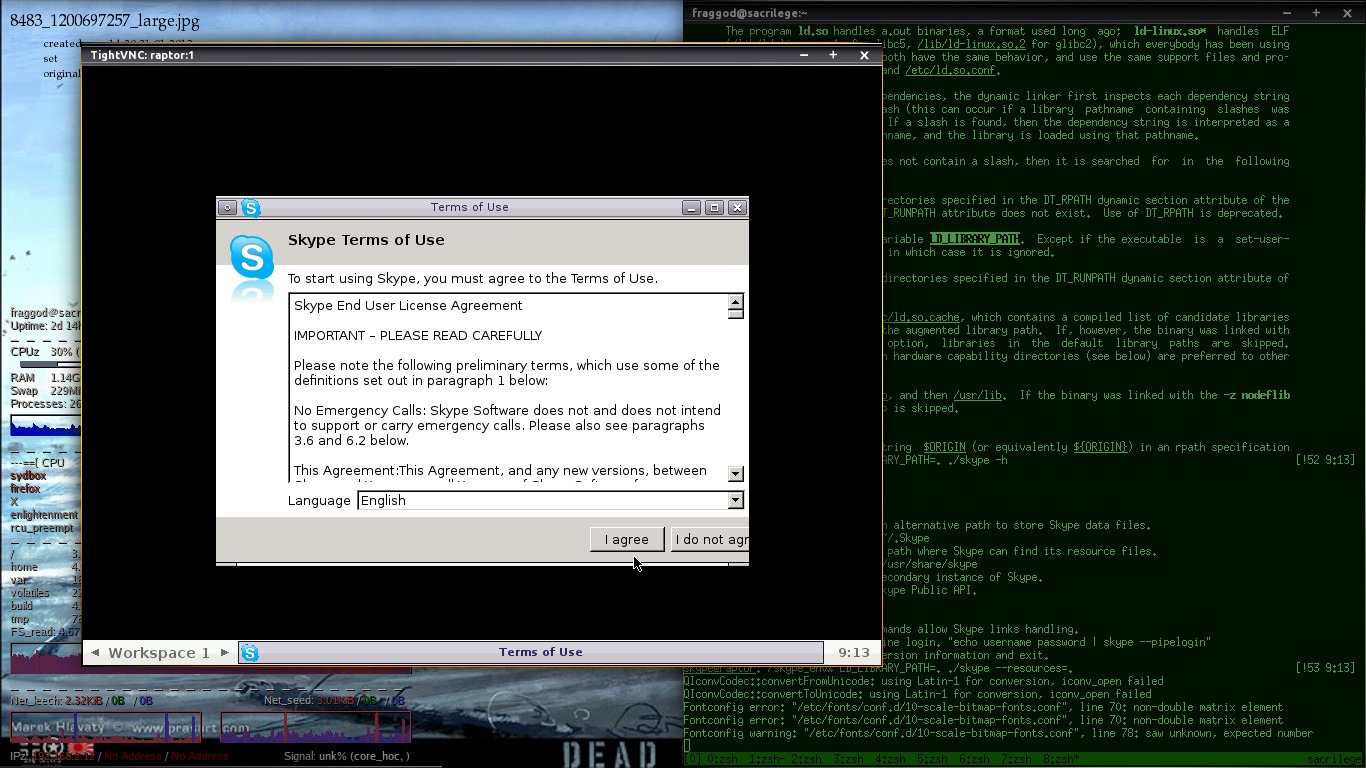
Yay!
So, to the API-to-IRC scripts then... probably in the next entry, as I get to
these myself.
Also following might be revised apparmor profile for such setup and maybe a
script to isolate the whole thing even further into namespaces (which is
interesting thing to try, but not sure how it might be useful yet with LSM
already in place).
All the interesting stuff for the whole endeavor can be found in the ad-hoc repo
I've created for it: https://github.com/mk-fg/skype-space
Jan 25, 2013
Ditched bloog engine here in favor of static pelican yesterday, and while I
was able to remember about keeping legacy links working, pretty sure I forgot
about guids on the feed, so apologies to anyone who might care.
Guess it's pointless to fix these now.
All the entries can be found on github now in rst-format, though older ones
might be a bit harder to read in the source, as they were mostly auto-converted
by pandoc and I only checked if they're still rendered correctly to html.
As appengine also made me migrate from master-slave db replication to the shiny
high-replication blobstore, I wonder if hosting static html here now counts as
abuse...
Jan 21, 2013
As I've been decompiling dynamic E config in the past
anyway, wanted to back it up to git repo along with the rest of them.
Quickly stumbled upon a problem though - while E doesn't really modify it
without me making some conscious changes, it reorders (or at least eet
produces such) sections and values there, making straight dump to git a bit
more difficult.
Plus, I have a
pet project to update
background, and it also introduces transient changes, so some pre-git
processing was in order.
e.cfg looks like this:
group "E_Config" struct {
  group "xkb.used_options" list {
    group "E_Config_XKB_Option" struct {
      value "name" string: "grp:caps_toggle";
    }
  }
  group "xkb.used_layouts" list {
    group "E_Config_XKB_Layout" struct {
      value "name" string: "us";
...
Simple way to make it "canonical" is just to order groups/values there
alphabetically, blanking-out some transient ones.
That needs a parser, and while regexps aren't really suited to that kind of
thing, pyparsing should work:
number = pp.Regex(r'[+-]?\d+(\.\d+)?')
string = pp.QuotedString('"') | pp.QuotedString("'")
value_type = pp.Regex(r'\w+:')
group_type = pp.Regex(r'struct|list')

value = number | string
block_value = pp.Keyword('value')\
  + string + value_type + value + pp.Literal(';')

block = pp.Forward()
block_group = pp.Keyword('group') + string\
  + group_type + pp.Literal('{') + pp.OneOrMore(block) + pp.Literal('}')
block << (block_group | block_value)

config = pp.StringStart() + block + pp.StringEnd()
Fun fact: this parser doesn't work.
Bails with some error in the middle of the large (~8k lines) real-world config,
while working for all the smaller pet samples.
I guess some buffer size must be tweaked (kinda unusual for python module
though), maybe I made a mistake there, or something like that.
So, yapps2-based parser:
parser eet_cfg:
  ignore: r'[ \t\r\n]+'
  token END: r'$'
  token N: r'[+\-]?[\d.]+'
  token S: r'"([^"\\]*(\\.[^"\\]*)*)"'
  token VT: r'\w+:'
  token GT: r'struct|list'

  rule config: block END {{ return block }}

  rule block: block_group {{ return block_group }}
    | block_value {{ return block_value }}
  rule block_group:
    'group' S GT r'\{' {{ contents = list() }}
    ( block {{ contents.append(block) }} )*
    r'\}' {{ return Group(S, GT, contents) }}

  rule value: S {{ return S }} | N {{ return N }}
  rule block_value: 'value' S VT value ';' {{ return Value(S, VT, value) }}
Less verbose (even with more processing logic here) and works.
Embedded in a python code (doing the actual sorting), it all looks like this (might be useful to work
with E configs, btw).
yapps2 actually generates quite readable code from it, and it was just
simpler (and apparently more bugproof) to write grammar rules in it.
ymmv, but it's a bit of a shame that pyparsing seem to be the about the only
developed parser-generator of such kind for python these days.
Had to package yapps2 runtime to install it properly, applying some community
patches (from debian package) in process and replacing some scary cli code
from 2003. Here's a fork.