Two questions:
- How to tell which pids (or groups of forks) eat most swap right now?
- How much RAM one apache/php/whatever really consumes?
Somehow people keep pointing me at "top" and "ps" tools to do this sort of
things, but there's an obvious problem:
#include <stdlib.h>
#include <unistd.h>

#define G 1024*1024*1024

int main (void) {
    (void *) malloc(2 * G);
    sleep(10);
    return 0;
}
This code will immediately float to 1st position in top, sorted by "swap" (F p
<return>), showing 2G even with no swap in the system.
Second question/issue is also common but somehow not universally recognized,
which is kinda obvious when scared admins (or whoever happen to ssh into web
backend machine) see N pids of something, summing up to more than total amount
of RAM in the system, like 50 httpd processes 50M each.
It gets even worse when tools like "atop" helpfully aggregate the numbers
("atop -p"), showing that there are 6 sphinx processes, eating 15G on a
machine with 4-6G physical RAM + 4-8G swap, causing local panic and mayhem.
The answer is, of course, that sphinx, apache and pretty much anything using
worker processes share a lot of memory pages between their processes, and not
just because of shared objects like libc.
Guess it's just general ignorance of how memory works in linux (or other
unix-os'es) of those who never had to write a fork() or deal with malloc's in C,
which kinda make lots of these concepts look fairly trivial.
So, mostly out of curiosity than the real need, decided to find a way to
answer these questions.
proc(5) reveals this data more-or-less via "maps" / "smaps" files, but that
needs some post-processing to give per-pid numbers.
Closest tools I was able to find were pmap from procps package and
ps_mem.py
script from coreutils
maintainer. Former seem to give only mapped memory region sizes, latter
cleverly shows shared memory divided by a number of similar processes,
omitting per-process numbers and swap.
Oh, and of course there are glorious valgrind and gdb, but both seem to be
active debugging tools, not much suitable for normal day-to-day operation
conditions and a bit too complex for the task.
So I though I'd write my own tool for the job to put the matter at rest once and
for all, and so I can later point people at it and just say "see?" (although I
bet it'll never be that simple).
Idea is to group similar processes (by cmd) and show details for each one, like
this:
agetty:
  -stats:
    private: 252.0 KiB
    shared: 712.0 KiB
    swap: 0
  7606:
    -stats:
      private: 84.0 KiB
      shared: 712.0 KiB
      swap: 0
    -cmdline: /sbin/agetty tty3 38400
    /lib/ld-2.12.2.so:
      -shared-with: rpcbind, _plutorun, redshift, dbus-launch, acpid, ...
      private: 8.0 KiB
      shared: 104.0 KiB
      swap: 0
    /lib/libc-2.12.2.so:
      -shared-with: rpcbind, _plutorun, redshift, dbus-launch, acpid, ...
      private: 12.0 KiB
      shared: 548.0 KiB
      swap: 0
    ...
    /sbin/agetty:
      -shared-with: agetty
      private: 4.0 KiB
      shared: 24.0 KiB
      swap: 0
    /usr/lib/locale/locale-archive:
      -shared-with: firefox, redshift, tee, sleep, ypbind, pulseaudio [updated], ...
      private: 0
      shared: 8.0 KiB
      swap: 0
    [anon]:
      private: 20.0 KiB
      shared: 0
      swap: 0
    [heap]:
      private: 8.0 KiB
      shared: 0
      swap: 0
    [stack]:
      private: 24.0 KiB
      shared: 0
      swap: 0
    [vdso]:
      private: 0
      shared: 0
      swap: 0
  7608:
    -stats:
      private: 84.0 KiB
      shared: 712.0 KiB
      swap: 0
    -cmdline: /sbin/agetty tty4 38400
    ...
  7609:
    -stats:
      private: 84.0 KiB
      shared: 712.0 KiB
      swap: 0
    -cmdline: /sbin/agetty tty5 38400
    ...
So it's obvious that there are 3 agetty processes, which ps will report as 796
KiB RSS:
root 7606 0.0 0.0 3924 796 tty3 Ss+ 23:05 0:00 /sbin/agetty tty3 38400
root 7608 0.0 0.0 3924 796 tty4 Ss+ 23:05 0:00 /sbin/agetty tty4 38400
root 7609 0.0 0.0 3924 796 tty5 Ss+ 23:05 0:00 /sbin/agetty tty5 38400
Each of which, in fact, consumes only 84 KiB of RAM, with 24 KiB more shared
between all agettys as /sbin/agetty binary, rest of stuff like ld and libc is
shared system-wide (shared-with list contains pretty much every process in the
system), so it won't be freed by killing agetty and starting 10 more of them
will consume ~1 MiB, not ~10 MiB, as "ps" output might suggest.
"top" will show ~3M of "swap" (same with "SZ" in ps) for each agetty, which is
also obviously untrue.
More machine-friendly (flat) output might remind of sysctl:
agetty.-stats.private: 252.0 KiB
agetty.-stats.shared: 712.0 KiB
agetty.-stats.swap: 0
agetty.7606.-stats.private: 84.0 KiB
agetty.7606.-stats.shared: 712.0 KiB
agetty.7606.-stats.swap: 0
agetty.7606.-cmdline: /sbin/agetty tty3 38400
agetty.7606.'/lib/ld-2.12.2.so'.-shared-with: ...
agetty.7606.'/lib/ld-2.12.2.so'.private: 8.0 KiB
agetty.7606.'/lib/ld-2.12.2.so'.shared: 104.0 KiB
agetty.7606.'/lib/ld-2.12.2.so'.swap: 0
agetty.7606.'/lib/libc-2.12.2.so'.-shared-with: ...
...
Script. No dependencies
needed, apart from python 2.7 or 3.X (works with both w/o conversion).
Some optional parameters are supported:
usage: ps_mem_details.py [-h] [-p] [-s] [-n MIN_VAL] [-f] [--debug] [name]
Detailed process memory usage accounting tool.
positional arguments:
  name           String to look for in process cmd/binary.
optional arguments:
  -h, --help     show this help message and exit
  -p, --private  Show only private memory leaks.
  -s, --swap     Show only swapped-out stuff.
  -n MIN_VAL, --min-val MIN_VAL
            Minimal (non-inclusive) value for tracked parameter
            (KiB, see --swap, --private, default: 0).
  -f, --flat     Flat output.
  --debug        Verbose operation mode.
For example, to find what hogs more than 500K swap in the system:
# ps_mem_details.py --flat --swap -n 500
memcached.-stats.private: 28.4 MiB
memcached.-stats.shared: 588.0 KiB
memcached.-stats.swap: 1.5 MiB
memcached.927.-cmdline: /usr/bin/memcached -p 11211 -l 127.0.0.1
memcached.927.[anon].private: 28.0 MiB
memcached.927.[anon].shared: 0
memcached.927.[anon].swap: 1.5 MiB
squid.-stats.private: 130.9 MiB
squid.-stats.shared: 1.2 MiB
squid.-stats.swap: 668.0 KiB
squid.1334.-cmdline: /usr/sbin/squid -NYC
squid.1334.[heap].private: 128.0 MiB
squid.1334.[heap].shared: 0
squid.1334.[heap].swap: 660.0 KiB
udevd.-stats.private: 368.0 KiB
udevd.-stats.shared: 796.0 KiB
udevd.-stats.swap: 748.0 KiB
...or what eats more than 20K in agetty pids (should be useful to see which .so
or binary "leaks" in a process):
# ps_mem_details.py --private --flat -n 20 agetty
agetty.-stats.private: 252.0 KiB
agetty.-stats.shared: 712.0 KiB
agetty.-stats.swap: 0
agetty.7606.-stats.private: 84.0 KiB
agetty.7606.-stats.shared: 712.0 KiB
agetty.7606.-stats.swap: 0
agetty.7606.-cmdline: /sbin/agetty tty3 38400
agetty.7606.[stack].private: 24.0 KiB
agetty.7606.[stack].shared: 0
agetty.7606.[stack].swap: 0
agetty.7608.-stats.private: 84.0 KiB
agetty.7608.-stats.shared: 712.0 KiB
agetty.7608.-stats.swap: 0
agetty.7608.-cmdline: /sbin/agetty tty4 38400
agetty.7608.[stack].private: 24.0 KiB
agetty.7608.[stack].shared: 0
agetty.7608.[stack].swap: 0
agetty.7609.-stats.private: 84.0 KiB
agetty.7609.-stats.shared: 712.0 KiB
agetty.7609.-stats.swap: 0
agetty.7609.-cmdline: /sbin/agetty tty5 38400
agetty.7609.[stack].private: 24.0 KiB
agetty.7609.[stack].shared: 0
agetty.7609.[stack].swap: 0
I've delayed update of the whole libnotify / notification-daemon /
notify-python stack for a while now, because notification-daemon got too
GNOME-oriented around 0.7, making it a lot more simpler, but sadly dropping
lots of good stuff I've used there.
Default nice-looking theme is gone in favor of black blobs (although colors
are probably subject to gtkrc); it's one-note-at-a-time only, which makes
reading them intolerable; configurability was dropped as well, guess blobs
follow some gnome-panel settings now.
Older notification-daemon versions won't build with newer libnotify.
Same problem with notify-python, which seem to be unnecessary now, since it's
functionality is accessible via introspection and
PyGObject (part known as
PyGI before merge - gi.repositories.Notify).
Looking for more-or-less drop-in replacements I've found
notipy project, which looked like what I
needed, and the best part is that it's python - no need to filter notification
requests in a proxy anymore, eliminating some associated complexity.
Project has a bit different goals however, them being simplicity, less deps
and concept separation, so I incorporated (more-or-less) notipy as a simple
NotificationDisplay class into notification-proxy, making it into
notification-thing
(first name that came to mind, not that it matters).
All the rendering now is in python using PyGObject (gi) / gtk-3.0 toolkit,
which seem to be a good idea, given that I still have no reason to keep Qt in
my system, and gtk-2.0 being obsolete.
Exploring newer Gtk stuff like
css styling and honest
auto-generated interfaces was fun, although the whole mess seem to be much
harder than expected. Simple things like adding a border, margins or some
non-solid background to existing widgets seem to be very complex and totally
counter-intuitive, unlike say, doing the same (even in totally cross-browser
fashion) with html. I also failed to find a way to just draw what I want on
arbitrary widgets, looks like it was removed (in favor of GtkDrawable) on
purpose.
My (uneducated) guess is that gtk authors geared toward "one way to do one
thing" philosophy, but unlike Python motto, they've to ditch the "one
*obvious* way" part. But then, maybe it's just me being too lazy to read
docs properly.
Looking over Desktop Notifications
Spec in process, I've
noticed that there are more good ideas that I'm not using, so guess I
might need to revisit local notification setup in the near future.
Usually I was using fabric to clone similar stuff to many machines, but since
I've been deploying
csync2 everywhere to
sync some web templates and I'm not the only one introducing changes, it
ocurred to me that it'd be great to use it for scripts as well.
Problem I see there is security - most scripts I need to sync are cronjobs
executed as root, so updating some script one one (compromised) machine with
"rm -Rf /*" and running csync2 to push this change to other machines will
cause a lot of trouble.
So I came up with simple way to provide one-time keys to csync2 hosts, which
will be valid only when I want them to.
Idea is to create FIFO socket in place of a key on remote hosts, then just
pipe a key into each socket while script is running on my dev
machine. Simplest form of such "pipe" I could come up with is an "ssh host
'cat >remote.key.fifo'", no fancy sockets, queues or protocols.
That way, even if one host is compromised changes can't be propagnated to
other hosts without access to fifo sockets there and knowing the right
key. Plus running sync for that "privileged" group accidentally will just
result in a hang 'till the script will push data to fifo socket - nothing will
break down or crash horribly, just wait.
Key can be spoofed of course, and sync can be timed to the moment the keys are
available, so the method is far from perfect, but it's insanely fast and
convenient.
Implementation is
fairly simple
twisted eventloop, spawning ssh
processes (guess
twisted.conch or stuff like
paramiko can be used for ssh implementation there, but
neither performance nor flexibility is an issue with ssh binary).
Script also (by default) figures out the hosts to connect to from the provided
group name(s) and the local copy of csync2 configuration file, so I don't have
to specify keep separate list of these or specify them each time.
As always, twisted makes it insanely simple to write such IO-parallel loop.
csync2 can be configured like this:
group sbin_sync {
    host host1 host2;
    key /var/lib/csync2/privileged.key;
    include /usr/local/sbin/*.sh
}
And then I just run it with something like "./csync2_unlocker.py sbin_sync"
when I need to replicate updates between hosts.
Source.
I think in ideal world this shouldn't be happening, it really is a job for a
proper database engine.
Some filesystems (reiserfs,
pomegranate) are fairly good at dealing with
such use-cases though, but not the usual tools for working with fs-based data,
which generally suck all the time and resources on such a mess.
In my particular case, there's a (mostly) legacy system, which keeps such
tons-of-files db with ~5M files, taking about 5G of space, which have to be
backed-up somehow. Every file can be changed, added or unlinked, total
consistency between parts (like snapshotting the same point in time for every
file) is not necessary. Contents are (typically) php serializations (yuck!).
Tar and rsync are prime example of tools that aren't quite fit for the task -
both eat huge amounts of RAM (gigs) and time to do this, especially when you
have to make these backups incremental, and ideally this path should be
backed-up every single day.
Both seem to build some large and not very efficient list of existing files in
memory and then do a backup against that. Both aren't really good at capturing
the state - increments either take a huge amounts of space/inodes (with rsync
--link-dest) or loose info on removed entries (tar).
Nice off-the-shelf alternatives are
dar, which
is not a fs-to-stream packer, but rather squashfs-like image builder with the
ability to make proper incremental backups, and of course
mksquashfs itself, which supports append these days.
These sound nice, but somehow I failed to check for "append" support in
squashfs (although I remember hearing about it before), plus there's still
doesn't seem to be a way to remove paths.
Results turned out to be really good - 40min to back all this stuff up from
scratch and under 20min to do an incremental update (mostly comparing the
timestamps plus adding/removing new/unlinked keys). Implementation on top of
berkdb also turned out to be fairly straightorward (just 150 lines total!)
with just a little bit of optimization magic to put higter-level paths before
the ones nested inside (by adding \0 and \1 bytes before basename for
file/dir).
I still need to test it against dar and squashfs when I'll have more time (as
if that will ever happen) on my hands, but even such makeshift python
implementation (which includes full "extract" and "list" functionality though)
proven to be sufficient and ended up in a daily crontab.
So much for the infamous "don't keep the files in a database!" argument, btw,
wonder if original developers of this "db" used this hype to justify this
mess...
Obligatory proof-of-concept code link.
Update:tried mksquashfs, but quickly pulled a plug as it started to eat
more than 3G of RAM - sadly unfit for the task as well. dar also ate ~1G and
been at it for a few hours, guess no tool cares about such fs use-cases at all.
The biggest issue I have with
fossil scm is that
it's not
git - there are just too many advanced tools
which I got used to with git over time, which probably will never be
implemented in fossil just because of it's "lean single binary" philosophy.
And things get even worse when you need to bridge git-fossil repos - common
denominator here is git, so it's either constant "export-merge-import" cycle
or some hacks, since fossil doesn't support incremental export to a git repo
out of the box (but it does have
support for full import/export), and git
doesn't seem to have a plugin to track fossil remotes (yet?).
I thought of migrating away from fossil, but there's just no substitute
(although
quite a lot of attempts to implement that) for distributed issue tracking and
documentation right in the same repository and plain easy to access format
with a sensible web frontend for those who don't want to install/learn scm and
clone the repo just to file a ticket.
None of git-based tools I've been able to find seem to meet this (seemingly)
simple criterias, so dual-stack it is then.
Solution I came up with is real-time mirroring of all the changes in fossil
repositories to a git.
- watching fossil-path with inotify(7) for IN_MODIFY events (needs
pyinotify for that)
- checking for new revisions in fossil (source) repo against tip of a
git
- comparing these by timestamps, which are kept in perfect sync (by
fossil-export as well)
- exporting revisions from fossil as a full artifacts (blobs),
importing these into git via git-fast-import
It's also capable to do oneshot updates (in which case it doesn't need anything
but python-2.7, git and fossil), bootstrapping git mirrors as new fossil repos
are created and catching-up with their sync on startup.
While the script uses quite a low-level (but standard and documented here and there) scm
internals, it was actually very easy to write (~200 lines, mostly simple
processing-generation code), because both scms in question are built upon
principles of simple and robust design, which I deeply admire.
Limitation is that it only tracks one branch, specified at startup ("trunk",
by default), and doesn't care about the tags at the moment, but I'll probably
fix the latter when I'll do some tagging next time (hence will have a
realworld test case).
It's also trivial to make the script do two-way synchronization, since fossil
supports "fossil import --incremental" update right from git-fast-export, so
it's just a simple pipe, which can be run w/o any special tools on demand.
Script itself.
fossil_echo --help:
usage: fossil_echo [-h] [-1] [-s] [-c] [-b BRANCH] [--dry-run] [-x EXCLUDE]
                      [-t STAT_INTERVAL] [--debug]
                      fossil_root git_root

Tool to keep fossil and git repositories in sync. Monitors fossil_root for
changes in *.fossil files (which are treated as source fossil repositories)
and pushes them to corresponding (according to basename) git repositories.
Also has --oneshot mode to do a one-time sync between specified repos.

positional arguments:
  fossil_root           Path to fossil repos.
  git_root              Path to git repos.

optional arguments:
  -h, --help            show this help message and exit
  -1, --oneshot         Treat fossil_root and git_root as repository paths and
                        try to sync them at once.
  -s, --initial-sync    Do an initial sync for every *.fossil repository found
                        in fossil_root at start.
  -c, --create          Dynamically create missing git repositories (bare)
                        inside git-root.
  -b BRANCH, --branch BRANCH
                        Branch to sync (must exist on both sides, default:
                        trunk).
  --dry-run             Dump git updates (fast-import format) to stdout,
                        instead of feeding them to git. Cancels --create.
  -x EXCLUDE, --exclude EXCLUDE
                        Repository names to exclude from syncing (w/o .fossil
                        or .git suffix, can be specified multiple times).
  -t STAT_INTERVAL, --stat-interval STAT_INTERVAL
                        Interval between polling source repositories for
                        changes, if there's no inotify/kevent support
                        (default: 300s).
  --debug               Verbose operation mode.
xdiskusage(1) is a simple and useful
tool to visualize disk space usage (a must-have thing in any admin's
toolkit!).
Probably the best thing about it is that it's built on top of "du" command, so
if there's a problem with free space on a remote X-less server, just "ssh
user@host 'du -k' | xdiskusage" and in a few moments you'll get the idea
where the space has gone to.
Lately though I've had problems building fltk, and noticed that xdiskusage is
the only app that uses it on my system, so I just got rid of both, in hopes
that I'll be able to find some lite gtk replacement (don't have qt either).
Maybe I do suck at googling (or just giving up too early), but
filelight (kde util),
baobab (gnome util) and
philesight (ruby) are pretty much the only
alternatives I've found. First one drags in half of the kde, second one - half
of gnome, and I don't really need ruby in my system either.
And for what? xdiskusage seem to be totally sufficient and much easier to
interpret (apparently it's a lot easier to compare lengths than angles for me)
than stupid round graphs that filelight and it's ruby clone produce, plus it
looks like a no-brainer to write.
There are some CLI alternatives as well, but this task is definitely outside
of CLI domain.
So I wrote this tool. Real source is
actually coffeescript, here, JS is compiled from it.
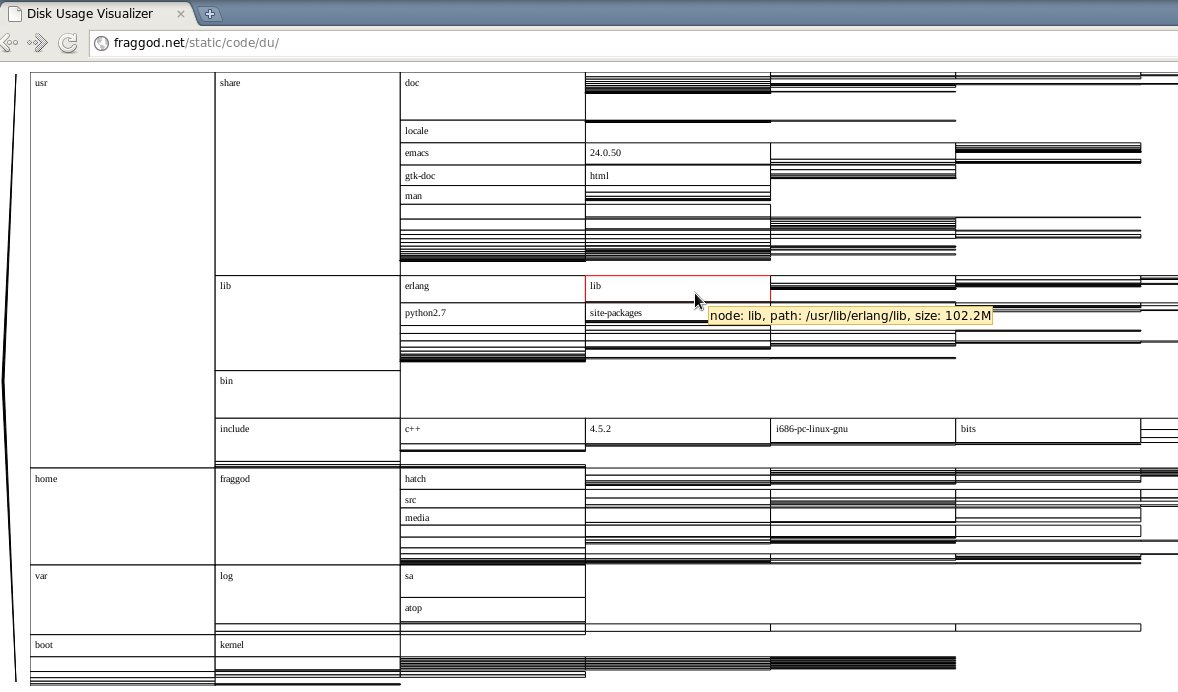
Initially I wanted to do this in python, but then took a break to read some
reddit and blogs, which just happened to push me in the direction of a
web. Good thing they did, too, as it turned out to be simple and
straightforward to work with graphics there these days.
I didn't use (much-hyped) html5 canvas though, since svg seem to be much more
fitting in html world, plus it's much easier to make it interactive (titles,
events, changes, etc).
Aside from the intended stuff, tool also shows performance shortcomings in
firefox and opera browsers - they both are horribly slow on pasting large text
into textarea (or iframe with "design mode") and just slow on rendering
svg. Google chrome is fairly good at both tasks.
Not that I'll migrate all my firefox addons/settings and habits to chrome
anytime soon, but it's certainly something to think about.
Also, JS calculations can probably be made hundred-times faster by caching
size of the traversed subtrees (right now they're recalculated gozillion times
over, and that's basically all the work).
I was just too lazy to do it initially and textarea pasting is still a lot
slower than JS, so it doesn't seem to be a big deal, but guess I'll do that
eventually anyway.
Working with a number of non-synced servers remotely (via fabric) lately, I've found the need to push updates to a set of
(fairly similar) files.
It's a bit different story for each server, of course, like crontabs for a web
backend with a lot of periodic maintenance, data-shuffle and cache-related
tasks, firewall configurations, common html templates... well, you get the
idea.
I'm not the only one who makes the changes there, and without any
change/version control for these sets of files, state for each file/server
combo is essentially unique and accidental change can only be reverted from a
weekly backup.
Not really a sensible infrastructure as far as I can tell (or just got used
to), but since I'm a total noob here, working for only a couple of weeks,
global changes are out of question, plus I've got my hands full with the other
tasks as it is.
So, I needed to change files, keeping the old state for each one in case
rollback is necessary, and actually check remote state before updating files,
since someone might've introduced either the same or conflicting change while
I was preparing mine.
Problem of conflicting changes can be solved by keeping some reference (local)
state and just applying patches on top of it. If file in question is important
enough, having such state is double-handy, since you can pull the remote state
in case of changes there, look through the diff (if any) and then decide
whether the patch is still valid or not.
Problem of rollbacks is solved long ago by various versioning tools.
Combined, two issues kinda beg for some sort of storage with a history of
changes for each value there, and since it's basically a text, diffs and
patches between any points of this history would also be nice to have.
It's the domain of the SCM's, but my use-case is a bit more complicated then
the usual usage of these by the fact that I need to create new revisions
non-interactively - ideally via something like a key-value api (set, get,
get_older_version) with the usual interactive interface to the history at
hand in case of any conflicts or complications.
Being most comfortable with
git, I looked for
non-interactive db solutions on top of it, and the simplest one I've found
was
gitshelve.
GitDB seem to be more powerful, but
unnecessary complex for my use-case.
Then I just implemented patch (update key by a diff stream) and diff methods
(generate diff stream from key and file) on top of gitshelve plus writeback
operation, and thus got a fairly complete implementation of what I needed.
Looking at such storage from a DBA perspective, it's looking pretty good -
integrity and atomicity are assured by git locking, all sorts of replication and
merging possible in a quite efficient and robust manner via git-merge and
friends, cli interface and transparency of operation is just superb. Regular
storage performance is probably far off db level though, but it's not an issue
in my use-case.
Here's gitshelve
and state.py, as used in my fabric
stuff. fabric imports can be just dropped there without much problem (I use
fabric api to vary keys depending on host).
Pity I'm far more used to git than pure-py solutions like
mercurial or
bazaar,
since it'd have probably been much cleaner and simpler to implement such
storage on top of them - they probably expose python interface directly.
Guess I'll put rewriting the thing on top of hg on my long todo list.
Had IPv6 tunnel from
HE for a few years now, but
since I've changed ISP about a year ago, I've been unable to use it because
ISP dropped sit tunnel packets for some weird reason.
A quick check yesterday revealed that this limitation seem to have been
lifted, so I've re-enabled the tunnel at once.
All the IPv6-enabled stuff started using AAAA-provided IPs at once, and that
resulted in some problems.
Particulary annoying thing is that
ZNC IRC bouncer
managed to loose connection to
freenode about five
times in two days, interrupting conversations and missing some channel
history.
Of course, problem can be easily solved by making znc connect to IPv4
addresses, as it was doing before, but since there's no option like "connect
to IPv4" and "irc.freenode.net" doesn't seem to have some alias like
"ipv4.irc.freenode.net", that'd mean either specifying single IP in znc.conf
(instead on DNS-provided list of servers) or filtering AAAA results, while
leaving A records intact.
Latter solution seem to be better in many ways, so I decided to look for
something that can override AAAA RR's for a single domain (irc.freenode.net in
my case) or a configurable list of them.
I use dead-simple dnscache resolver from
djbdns bundle, which doesn't seem to be capable of such
filtering by itself.
ISC BIND seem to have "filter-aaaa"
global option to provide A-only results to a list of clients/networks, but
that's also not what I need, since it will make IPv6-only mirrors (upon which
I seem to stumble more and more lately) inaccessible.
Rest of the recursive DNS resolvers doesn't seem to have even that capability,
so some hack was needed here.
Useful feature that most resolvers have though is the ability to query
specific DNS servers for a specific domains. Even dnscache is capable of doing
that, so putting BIND with AAAA resolution disabled behind dnscache and
forwarding freenode.net domain to it should do the trick.
But installing and running BIND just to resolve one (or maybe a few more, in
the future) domain looks like an overkill to me, so I thought of
twisted and it's names component, implementing DNS
protocols.
And all it took with twisted to implement such no-AAAA DNS proxy, as it turns
out, was these five lines of code:
class IPv4OnlyResolver(client.Resolver):
    def lookupIPV6Address(self, name, timeout = None):
        return self._lookup('nx.fraggod.net', dns.IN, dns.AAAA, timeout)

protocol = dns.DNSDatagramProtocol(
    server.DNSServerFactory(clients=[IPv4OnlyResolver()]) )
Meh, should've skipped the search for existing implementation altogether.
That script plus "echo IP > /etc/djbdns/cache/servers/freenode.net" solved the
problem, although dnscache doesn't seem to be capable of forwarding queries to
non-standard port, so proxy has to be bound to specific localhost interface, not
just some wildcard:port socket.
Code, with trivial CLI, logging, dnscache forwarders-file support and redirected
AAAA-answer caching, is here.
I've heard about how easy it is to control stuff with a parallel port, but
recently I've been asked to write a simple script to send repeated signals to
some hardware via lpt and I really needed some way to test whether signals are
coming through or not.
Googling around a bit, I've found that it's trivial to plug leds right into
the port and did just that to test the script.
Since it's trivial to control these leds and they provide quite a simple way for
a visual notification for an otherwise headless servers, I've put together
another script to monitor system resources usage and indicate extra-high load
with various blinking rates.
Probably the coolest thing is that parallel port on mini-ITX motherboards comes
in a standard "male" pin group like usb or audio with "ground" pins exactly
opposite of "data" pins, so it's easy to take a few leds (power, ide, and they
usually come in different colors!) from an old computer case and plug these
directly into the board.
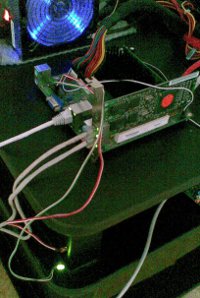
Making leds blink actually involves an active switching of data bits on the
port in an infinite loop, so I've forked one subprocess to do that while
another one checks/processes the data and feeds led blinking intervals'
updates to the first one via pipe.
System load data is easy to acquire from "/proc/loadavg" for cpu and as
"%util" percentage from "sar -d" reports.
And the easiest way to glue several subprocesses and a timer together into an
eventloop is
twisted, so the script is
basically 150 lines sar output processing, checks and blinking rate settings.
Obligatory link to the source. Deps
are python-2.7, twisted
and pyparallel.
Guess mail notifications could've been just as useful, but quickly-blinking leds
are more spectacular and kinda way to utilize legacy hardware capabilities that
these motherboards still have.